Bookkeeping for Ecommerce: A Practical Founder's Guide
A practical bookkeeping for ecommerce playbook covering COGS, inventory, marketplace reconciliation, GST/BAS, automations, KPIs and when to call a virtual CFO.
Ansh Malhotra

You've had a strong month. Shopify shows healthy sales, Amazon has paid out, and the bank balance looks reassuring. Then you open the P&L and find that profit doesn't match the cash, inventory seems to have disappeared, and the next supplier payment is due before the next marketplace settlement arrives.
That confusion isn't a bookkeeping failure in the ordinary sense. Ecommerce money moves through sales channels, payment processors, fulfilment providers, refunds, fees and GST controls before it reaches your bank account. A deposit is only the final net result, not the sale itself.
Australia's bookkeeping industry has already moved heavily towards cloud systems. Ninety-four per cent of bookkeeping professionals reported using online software to manage client accounts, with Xero the most popular platform among respondents at 37%, according to an Australian bookkeeping survey. For an online store, the important question isn't whether your books are in the cloud. It's whether your systems explain every payout, refund, fee and unit of stock.
Table of Contents
Why Most Ecommerce Founders Think They Are Profitable When They Are Not
Setting Up a Chart of Accounts That Actually Fits an Online Store
When to Hand Bookkeeping to a Virtual CFO and What to Expect
Why Most Ecommerce Founders Think They Are Profitable When They Are Not
A founder I worked with once described the business as “profitable but cash-starved”. Shopify sales were climbing, Amazon settlements arrived regularly, and the bank account stayed active. Yet the owner couldn't explain why the business needed another stock purchase facility to keep trading.
The problem appeared when we rebuilt the month from the source reports. Product purchases had been expensed when paid, rather than held as inventory until sale. Marketplace fees were hidden inside net payouts. A refund processed after month-end had been posted against the wrong period. The dashboard showed demand. It didn't show the economics of fulfilling that demand.
Three blind spots cause most of the damage:
COGS is recorded at purchase date: The store appears less profitable when stock arrives, then more profitable when it sells, because the cost isn't matched to the revenue.
Fees vanish inside deposits: A platform might collect gross customer payments, deduct processing and selling fees, then transfer only the balance. Treating that transfer as sales hides the cost of acquiring and serving each order.
Refunds lose their timing: A refund can be approved on one date, deducted from a later settlement and returned to a customer through a different payment method. Without a refund clearing process, revenue and cash tell different stories.
Service businesses usually have a simpler flow. An invoice is issued, a client pays, and the bank transaction can be matched directly. Ecommerce bookkeeping has to reconstruct the commercial event from multiple records.
Practical rule: Never use the bank feed as your sales report. Use platform settlement data to explain the bank deposit, then use the ledger to show what the sale cost you.
A proper profitability analysis for ecommerce brands should separate product margin from channel fees, fulfilment costs, refunds and operating expenses. The workflow below is designed to get you there without relying on a reassuring but incomplete sales dashboard.
Setting Up a Chart of Accounts That Actually Fits an Online Store
A generic chart of accounts gives an online store too little information. One line called “Sales” can't tell you whether Shopify, Amazon or eBay is producing the strongest contribution after fees. One line called “Cost of Sales” can't tell you whether margin is being reduced by supplier pricing, international freight or fulfilment charges.
Start with the commercial flow, not the template supplied by your accounting software.
Build the revenue side around channels
Create separate revenue accounts for Shopify product sales, Amazon product sales, eBay product sales and other marketplace sales. Add distinct accounts for customer-paid shipping, gift cards where relevant, discounts and refunds or other contra-revenue adjustments.
Shipping income deserves its own line because it shouldn't be confused with product revenue. A customer-paid delivery charge may offset freight or fulfilment costs, but combining it with product sales makes product pricing harder to assess.
Keep inventory costs separate from selling costs
Your COGS structure should make the cost of the product visible. Use separate accounts for product purchases transferred into inventory, inbound freight, duty, port and clearance charges, packaging that forms part of the landed cost, and inventory adjustments.
Platform fees belong in a separate selling expense group. Shopify transaction charges, Amazon referral or fulfilment fees, eBay selling fees, Stripe processing fees and PayPal fees shouldn't be buried in general overhead. Their location in the chart determines whether your gross margin and channel contribution reports mean anything.
Add clearing accounts for money that hasn't reached the bank
Use a clearing account for each significant payment flow, such as Shopify Payments, Stripe, PayPal and marketplace settlements. Sales and deductions are posted to the clearing account. The bank deposit clears the net amount. The balance should represent money still held, delayed, reserved or under review by the processor.
Your GST control accounts should also be configured consistently with the BAS reporting method you use. The ATO's simpler BAS GST bookkeeping guide identifies G1 for total sales, 1A for GST on sales and 1B for GST on purchases.
Account Category | Weak Default | Ecommerce-Tuned Version |
|---|---|---|
Revenue | Sales | Shopify sales, Amazon sales, eBay sales, shipping income, discounts and refunds |
COGS | Cost of goods sold | Product cost, inbound freight, duty, clearance, packaging and stock adjustments |
Platform costs | Bank fees or general expenses | Separate Shopify, Amazon, eBay, Stripe and PayPal fee accounts |
Payments | Bank deposits recorded as income | Individual clearing accounts for each processor and marketplace |
GST | GST account only | Sales and purchase tax controls mapped to BAS reporting |
Inventory | Purchases expensed immediately | Inventory asset, stock movements and periodic adjustments |
A useful test is simple. If your monthly P&L can't show revenue and direct costs by channel, the chart is not ready for ecommerce decision-making.
Inventory Accounting and Landed Cost Without the Headache
Inventory is not an ordinary expense when you buy it. It's an asset on the balance sheet until the related goods are sold, at which point the appropriate cost moves into COGS. Australian ecommerce bookkeeping guidance also identifies three stock balances that need monthly reconciliation: stock on hand, stock in transit and stock held by a third-party logistics provider or marketplace fulfilment centre. See this ecommerce inventory management guide for a practical view of how those systems need to connect.
Use the three-bucket stock check
Your month-end inventory file should answer three separate questions:
What is physically available in your warehouse? Match the quantity report to the accounting valuation.
What has been purchased but hasn't arrived? Stock in transit needs supporting purchase and freight records, with clear treatment for goods that have not yet reached your control.
What is held elsewhere? Reconcile units and value at Amazon fulfilment centres, a 3PL or another external warehouse.
The third bucket is where many growing brands lose visibility. The stock exists, but it isn't in the founder's building, so damaged, lost, returned or reserved units can remain in the books long after they stop being sellable.
Capitalise the cost of getting stock ready to sell
Invoice price is only one component of cost. Australian guidance says landed cost should include relevant international freight, duty, port and clearance charges, rather than leaving those amounts as unrelated overhead. That changes the unit economics you use for pricing and replenishment.
Suppose a product costs $12 from the supplier. If freight, duty and clearance bring the landed cost to $19, the product should be assessed using the latter figure, not the supplier invoice alone. Those amounts are from the operational example in this guide, not a general cost assumption. The accounting point remains the same: margin is calculated on what it costs to get sellable stock into position.
Inventory rule: A cheap purchase price can still produce an expensive product once the full inbound journey is allocated correctly.
A monthly routine should reconcile opening stock, purchases, landed-cost additions, units sold, returns, write-offs and closing stock. Investigate differences rather than forcing the balance to agree. A forced adjustment may close the spreadsheet while hiding shrinkage, receiving errors or a connector failure.
Use the following video as a visual companion to the stock and reconciliation workflow:
Reconciling Shopify, Amazon, eBay and PayPal Payouts
A Shopify payout landing in the bank on Friday may combine orders, refunds and fees from several earlier days. Treating that deposit as one sale hides the activity that produced it.
Start with the Shopify or Shopify Payments payout report, then split each component before posting the bank transaction. The journal logic normally looks like this:
Gross product sales: Credit the relevant Shopify revenue account.
Customer discounts: Post as a contra-revenue adjustment, so the discount remains visible.
Refunds and chargebacks: Debit refunds or contra-revenue, then check whether returned stock is saleable.
Platform and payment fees: Debit the relevant Shopify or payment-processing expense accounts.
Shipping labels and fulfilment deductions: Post to the agreed shipping or fulfilment cost account.
GST collected: Capture the tax component according to the transaction's tax treatment and BAS mapping.
Net payout: Credit the processor clearing account. Clear it against the bank deposit when the money arrives.
The account names depend on your ledger and tax settings. The control does not. Gross activity, deductions and the net payout must agree, while the clearing account must match the bank deposit after timing differences are considered.
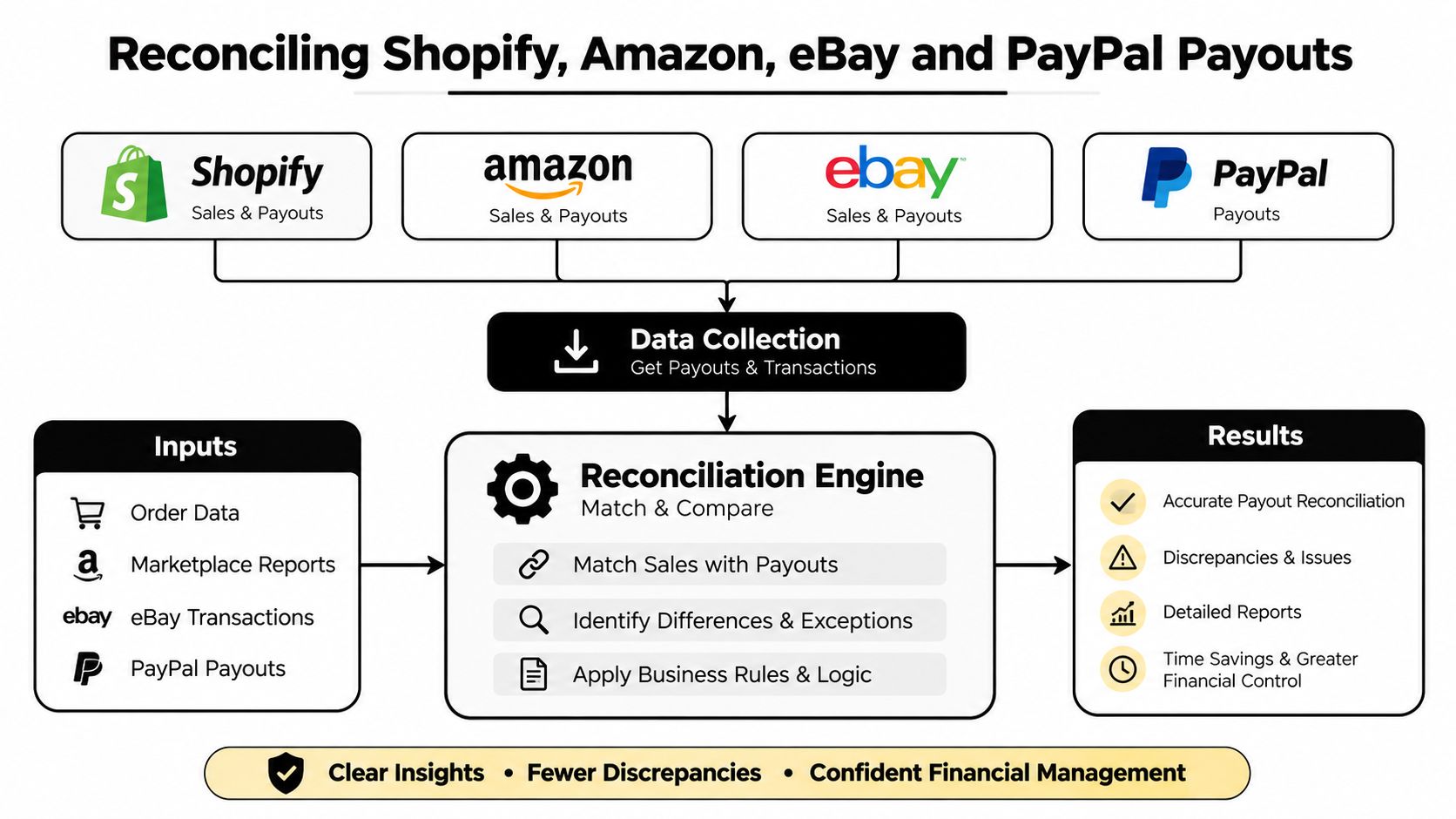
The diagram shows the settlement-report workflow across Shopify, Amazon, eBay and PayPal, including the split between gross transactions, deductions, clearing accounts and the final bank payout.
Apply the same logic to every channel
Amazon settlement reports can combine sales, refunds, referral deductions, fulfilment charges, storage or advertising costs and other adjustments. Do not post the final transfer as Amazon revenue. Post the gross activity and deductions, then use the Amazon clearing account to explain the transfer.
eBay uses the same control, although its labels and settlement timing differ. Separate item revenue, shipping income, refunds, selling fees, payment processing and other deductions before matching the net settlement.
PayPal can include direct customer receipts, refunds, disputes, fees and transfers between PayPal and the bank. One bank deposit may therefore represent several PayPal events. Stripe needs the same treatment when a payout combines transactions from different days.
Refunds are a frequent source of errors. A connector may import the refund while a manual bank-feed entry records it again, understating revenue and leaving the clearing account out of balance.
Run a weekly control
Once a week, check:
Payout completeness: Every settlement in the platform report appears in the ledger.
Deposit matching: Every bank deposit clears the correct processor or marketplace account.
Fee capture: Fees agree with the settlement report and are not sitting in an uncategorised account.
Refund integrity: Refunds appear once, in the correct channel, with the right stock treatment.
Unresolved balances: Older clearing-account balances have a documented explanation.
Weekly reconciliation is quicker than reconstructing a year at year-end. Source reports, order details and staff memory are still available, so mismatches can be traced before they become BAS and profit-reporting problems.
Preparing BAS and GST the ATO Will Not Query
BAS preparation should begin with reconciled source data, not with the bank balance. If Shopify, Amazon, eBay, Stripe and PayPal have been posted as net deposits, you can't reliably map the underlying sales and purchases to the BAS.
The ATO's core GST fields for this workflow are:
G1, Total sales: Report the reconciled sales figure using the GST-inclusive or GST-exclusive method selected for the BAS.
1A, GST on sales: Include the GST collected on taxable sales and relevant adjustments.
1B, GST on purchases: Include eligible GST credits supported by valid records and correctly coded purchases.
The ATO also requires whole-dollar amounts and says each invoice should be entered only once. A monthly close gives you time to find duplicate imports, missing tax invoices and transactions posted in the wrong reporting period before lodgment.
Use a pre-lodgment review
Work through the same order every time:
Lock the reporting period in each platform and export the settlement or transaction reports.
Reconcile each processor clearing account to the relevant payouts and bank deposits.
Review gross sales, refunds, chargebacks, fees and GST coding separately.
Confirm purchases and expense claims supporting 1B have appropriate records.
Check that the BAS treatment agrees with whether your ledger is configured for GST-inclusive or GST-exclusive reporting.
Round only at the BAS reporting stage, not throughout the underlying transaction records.
Retain the working papers that show how the reported labels were calculated.
Marketplace facilitator arrangements need careful review. Don't assume every transaction through a platform has the same GST treatment as direct Shopify sales. Trace the platform's tax information and settlement detail to the relevant transaction type.
Fix the recurring errors
Duplicated Shopify payouts usually arise when an integration posts a settlement and someone separately records the bank deposit as sales. The bank line should clear the processor account, not create a second revenue entry.
Missed PayPal fees occur when the bank receipt is posted at its net amount. Rebuild the PayPal settlement so the fee is an expense and the gross customer activity remains visible.
Refunds posted twice happen when the platform import includes the refund and a manual credit note repeats it. Compare the refund report to the ledger before approving adjustments.
The ATO says GST records must support the income and expenses used for GST claims, including sales, tax invoices, fees, wages, adjustments and calculations, and those records must be kept for five years. The supporting ATO GST records requirements should form part of your close checklist.
Automations, Integrations and the Stack to Build
Automation works when it reproduces a controlled accounting decision. It fails when it moves bad classifications into the ledger faster.
A practical ecommerce stack has several layers. The cloud ledger, such as Xero or MYOB, holds the financial records and produces the P&L, balance sheet and cashflow reports. A channel connector, such as A2X, Cin7 or Link My Books, translates Shopify, Amazon or marketplace settlements into accounting entries. Shopify Payments, Stripe and PayPal remain payment sources with their own clearing accounts, while an inventory system manages quantities, purchasing and landed-cost information.
The ECORN guide to accounting for Shopify is useful when assessing how a Shopify store should connect to accounting software. The key is not selecting the longest list of integrations. It's deciding which system owns each piece of data.
Match the stack to the operating stage
A solo founder with one store may only need a cloud ledger, one reliable connector and a disciplined inventory file. Adding multiple apps before the transaction flow is understood creates duplicate products, conflicting tax rules and unexplained clearing balances.
A team selling across Shopify, Amazon and eBay needs stronger ownership rules. The order platform may own sales detail, the inventory system may own quantities and landed cost, and the ledger may own the financial summary. Write those rules down before enabling automatic journals.
For more practical ideas on reducing repetitive work, see this guide to automating business processes. Automation should remove repetitive splitting and matching, not remove review.
Automation principle: Automate the predictable. Review the judgement calls.
Automate first, inspect continuously
Start with payout splits, GST coding rules and clearing-account postings. These are repetitive and can be tested against settlement reports.
Keep inventory adjustments, damaged stock, unusual refunds, chargebacks and manual landed-cost allocations under review. Those entries require context that an integration may not have.
Audit the stack quarterly. Select a recent payout from each channel and trace it from the platform report to the connector, ledger, clearing account and bank statement. Check tax codes, account mappings, refund handling and date settings. A connector can remain technically connected while posting the wrong account for months.

Turn clean books into decisions
A dashboard is only useful if each number leads to an action. Review gross margin by channel to decide whether pricing or product mix needs attention. Review contribution margin after marketplace and payment fees before increasing advertising on a product that sells well but leaves little cash.
Track the cash conversion cycle to understand how long money is tied up between paying suppliers, holding stock and receiving customer funds. Monitor stock turn to identify slow-moving products before the next purchase order traps more cash. Review the refund rate as a percentage of revenue for signals about product quality, sizing, description accuracy or customer expectations. Use customer acquisition cost payback to decide whether a campaign funds itself quickly enough for your cash position.
Your weekly scorecard can stay small:
Sales and gross margin by channel
Contribution margin for priority products
Cash available versus upcoming supplier and operating commitments
Stock position and open purchase orders
Refunds, chargebacks and unresolved payout balances
The monthly P&L should separate product margin, channel costs and overhead. Cash left in the bank isn't the same as operating profit, especially when a large portion of cash belongs in stock or is awaiting settlement.
For a growing brand, add a 13-week cashflow forecast. Include expected platform settlements, supplier payments, payroll, tax obligations, freight, marketing commitments and planned stock purchases. Update the forecast weekly. The value is not perfect prediction. It's early warning when growth creates a funding gap.
When to Hand Bookkeeping to a Virtual CFO and What to Expect
DIY bookkeeping stops being sensible when the founder can no longer maintain the controls. Common triggers include turnover above roughly $1.5 million, multi-channel operations, or spending more than five hours a week on finance instead of growth. Those thresholds are practical decision points, not legal requirements.
Start by handing over the work that protects the integrity of the numbers:
Monthly close: Reconcile channels, payment processors, bank accounts and inventory.
BAS review: Check GST coding, labels, supporting records and unusual adjustments before lodgment.
Cashflow forecasting: Show when supplier, tax and payroll commitments collide with payout timing.
Management reporting: Produce a P&L that separates gross margin, channel costs and operating expenses.
A virtual CFO adds a different layer. They use the reconciled data to test pricing, compare channel contribution, review supplier terms, assess inventory funding and decide whether marketing spend is creating useful contribution. They should be able to explain not just what happened, but which decision follows.
The virtual CFO service overview can help you understand how that support differs from transaction processing alone. Look for a provider who can work inside your existing systems, document the close process, identify unreconciled balances and show you the assumptions behind every forecast.
Before making the move, ask:
Can the provider reconcile each channel independently?
Will they own the month-end timetable and review exceptions?
Can they explain inventory valuation and landed cost?
Do they connect BAS preparation to source records?
Will you receive decision-ready reporting, not just a list of transactions?
The right handover gives the founder reliable numbers and more time to act on them.
Nexist helps Australian ecommerce founders clean up channel payouts, inventory, BAS workflows and cashflow forecasting, then turn that information into practical management decisions. Visit Nexist to discuss a finance system that gives you a clearer view of profit, stock and cash before the next growth decision.
ecommerce bookkeeping, bookkeeping for ecommerce, Australian GST BAS, inventory accounting, virtual CFO ecommerce

" width="24px"/><g d="M 0 24.129 L 0 0.129 L 24 0.129 L 24 24.129 Z M 0 24.129 L 0 0.129 L 24 0.129 L 24 24.129 Z M 24 3 C 24 1.344 22.656 0 21 0 L 3 0 C 1.344 0 0 1.344 0 3 L 0 21 C 0 22.656 1.344 24 3 24 L 21 24 C 22.656 24 24 22.656 24 21 Z M 6.883 8.375 L 2.863 8.375 L 2.863 20.467 L 6.883 20.467 Z M 4.899 2.545 C 3.524 2.545 2.625 3.449 2.625 4.634 C 2.625 5.795 3.496 6.724 4.846 6.724 L 4.872 6.724 C 6.273 6.724 7.146 5.795 7.146 4.634 C 7.12 3.449 6.274 2.545 4.899 2.545 Z M 16.747 8.09 C 14.614 8.09 13.659 9.263 13.124 10.086 L 13.124 8.374 L 9.105 8.374 C 9.159 9.508 9.105 20.466 9.105 20.466 L 13.124 20.466 L 13.124 13.713 C 13.124 13.352 13.15 12.99 13.257 12.732 C 13.547 12.01 14.209 11.262 15.319 11.262 C 16.773 11.262 17.355 12.372 17.355 13.996 L 17.355 20.466 L 21.374 20.466 L 21.374 13.532 C 21.374 9.818 19.391 8.09 16.747 8.09 Z" fill="transparent" height="24.12890599668026px" id="dSFdkJotL" width="24px"><path d="M 0 24 L 0 0 L 24 0 L 24 24 Z" fill="transparent" height="24px" id="wscNJE44G" transform="translate(0 0.129)" width="24px"/><g d="M 0 24.129 L 0 0.129 L 24 0.129 L 24 24.129 Z M 24 3 C 24 1.344 22.656 0 21 0 L 3 0 C 1.344 0 0 1.344 0 3 L 0 21 C 0 22.656 1.344 24 3 24 L 21 24 C 22.656 24 24 22.656 24 21 Z M 6.883 8.375 L 2.863 8.375 L 2.863 20.467 L 6.883 20.467 Z M 4.899 2.545 C 3.524 2.545 2.625 3.449 2.625 4.634 C 2.625 5.795 3.496 6.724 4.846 6.724 L 4.872 6.724 C 6.273 6.724 7.146 5.795 7.146 4.634 C 7.12 3.449 6.274 2.545 4.899 2.545 Z M 16.747 8.09 C 14.614 8.09 13.659 9.263 13.124 10.086 L 13.124 8.374 L 9.105 8.374 C 9.159 9.508 9.105 20.466 9.105 20.466 L 13.124 20.466 L 13.124 13.713 C 13.124 13.352 13.15 12.99 13.257 12.732 C 13.547 12.01 14.209 11.262 15.319 11.262 C 16.773 11.262 17.355 12.372 17.355 13.996 L 17.355 20.466 L 21.374 20.466 L 21.374 13.532 C 21.374 9.818 19.391 8.09 16.747 8.09 Z" fill="transparent" height="24.12890599668026px" id="sTpjGo1tb" width="24px"><path d="M 0 24 L 0 0 L 24 0 L 24 24 Z" fill="transparent" height="24px" id="s7ffpmKOD" transform="translate(0 0.129)" width="24px"/><g d="M 24 3 C 24 1.344 22.656 0 21 0 L 3 0 C 1.344 0 0 1.344 0 3 L 0 21 C 0 22.656 1.344 24 3 24 L 21 24 C 22.656 24 24 22.656 24 21 Z M 6.883 8.375 L 2.863 8.375 L 2.863 20.467 L 6.883 20.467 Z M 4.899 2.545 C 3.524 2.545 2.625 3.449 2.625 4.634 C 2.625 5.795 3.496 6.724 4.846 6.724 L 4.872 6.724 C 6.273 6.724 7.146 5.795 7.146 4.634 C 7.12 3.449 6.274 2.545 4.899 2.545 Z M 16.747 8.09 C 14.614 8.09 13.659 9.263 13.124 10.086 L 13.124 8.374 L 9.105 8.374 C 9.159 9.508 9.105 20.466 9.105 20.466 L 13.124 20.466 L 13.124 13.713 C 13.124 13.352 13.15 12.99 13.257 12.732 C 13.547 12.01 14.209 11.262 15.319 11.262 C 16.773 11.262 17.355 12.372 17.355 13.996 L 17.355 20.466 L 21.374 20.466 L 21.374 13.532 C 21.374 9.818 19.391 8.09 16.747 8.09 Z" fill="transparent" height="24.000006px" id="D0ecaHEcW" transform="translate(0 0)" width="24px"><path d="M 24 3 C 24 1.344 22.656 0 21 0 L 3 0 C 1.344 0 0 1.344 0 3 L 0 21 C 0 22.656 1.344 24 3 24 L 21 24 C 22.656 24 24 22.656 24 21 Z" fill="rgb(55, 184, 218)" height="24.000006px" id="IPLFE6zXx" width="24px"/><path d="M 4.02 0 L 0 0 L 0 12.092 L 4.02 12.092 Z" fill="rgb(255, 255, 255)" height="12.09201px" id="FWhtzAyuY" transform="translate(2.863 8.375)" width="4.02px"/><path d="M 2.274 0 C 0.899 0 0 0.904 0 2.089 C 0 3.25 0.871 4.179 2.221 4.179 L 2.247 4.179 C 3.648 4.179 4.521 3.25 4.521 2.089 C 4.495 0.904 3.649 0 2.274 0 Z" fill="rgb(255, 255, 255)" height="4.17876px" id="VmOsKv4kO" transform="translate(2.625 2.545)" width="4.52095px"/><path d="M 7.641 0 C 5.509 0 4.554 1.173 4.019 1.996 L 4.019 0.284 L 0 0.284 C 0.053 1.419 0 12.376 0 12.376 L 4.019 12.376 L 4.019 5.623 C 4.019 5.262 4.045 4.9 4.151 4.642 C 4.442 3.92 5.103 3.172 6.214 3.172 C 7.667 3.172 8.25 4.282 8.25 5.907 L 8.25 12.376 L 12.269 12.376 L 12.269 5.442 C 12.269 1.728 10.286 0 7.641 0 Z" fill="rgb(255, 255, 255)" height="12.37626px" id="n1XUbhaq0" transform="translate(9.105 8.09)" width="12.268830000000001px"/></g></g></g></g></svg>)