How to Use AI Inventory Management: A 2026 Guide
Learn how Australian SMEs can implement AI inventory management, from data readiness to vendor selection, pilots, and ROI.
Ansh Malhotra

AI-powered demand forecasting cuts forecast error by 20% to 50% and reduces stockouts by 30% to 65% in retail and distribution, while AI-driven inventory optimisation lowers carrying costs by 25% to 35% on average. But the cash wins don't come from letting AI run your stock unchecked, they come from phased pilots, clean data, and human approval on the decisions that move cash.
Australian SMEs are still being sold a lazy version of AI inventory management, full automation, hands off, let the algorithm order everything. That's the wrong lesson. The advantage is augmented intelligence, where AI handles repetitive forecasting and replenishment work, while the owner keeps control of purchase commitments, supplier relationships, and strategic stock decisions. If you run ecommerce, wholesale, retail, or manufacturing, this is the practical way to turn inventory from a recurring headache into a managed asset.
Table of Contents
Why AI Inventory Management Changes Everything for Australian SMEs
Integrating AI Inventory With Your Existing Accounting and ERP Systems
Building Governance and Human Override Controls Into Your AI Workflow
Why AI Inventory Management Changes Everything for Australian SMEs
At 9 pm, the founder is still in the warehouse, counting slow movers, checking a spreadsheet, and wondering why the fast line sold out again before lunch. That's the inventory problem most Australian SMEs live with, not a theory deck, just cash stuck on the shelf and customers leaving because nobody caught the gap early enough.
The point of AI Inventory Management isn't to hand your stock over to software. It's to stop wasting owner time on repetitive guessing, then use the system to surface better replenishment decisions faster than a human can in Excel. In retail and distribution, AI-powered demand forecasting cuts forecast error by 20% to 50% and reduces stockouts by 30% to 65% according to the benchmark data compiled for 2026, while AI-driven inventory optimisation lowers carrying costs by 25% to 35% on average research source.
What changes in practice
You don't need a grand transformation programme. You need a workflow that tells you which SKUs deserve attention, which orders need sign-off, and which replenishment calls can be pushed into a reliable system.
Practical rule: if AI can reduce the number of manual exceptions your team handles each week, it's earning its keep. If it tries to override your commercial judgement, it's a liability.
That's why the smartest operators use AI as a control layer, not a replacement for management. For a useful example of how structured data inputs improve inventory decisions in a marketplace setting, the Amazon fulfillment data layer tips article is worth a look, because the logic around clean feeds and timely replenishment applies far beyond Amazon.
The rest of this guide is built for owners who want the upside without the hype. You'll see how to assess data, choose the right platform, connect it to accounting and ERP systems, run a pilot, measure ROI, and lock in governance so the system works for you instead of the other way around.
Assessing Your Data Readiness Before Touching AI
Most AI failures in inventory start with a simple mistake, people buy software before they know whether the data underneath it is usable. In Australian SMEs, inventory data is usually scattered across Xero, Excel, POS terminals, and a warehouse system that someone set up years ago and never cleaned up. That doesn't make AI impossible, it just means the first job is a data audit.
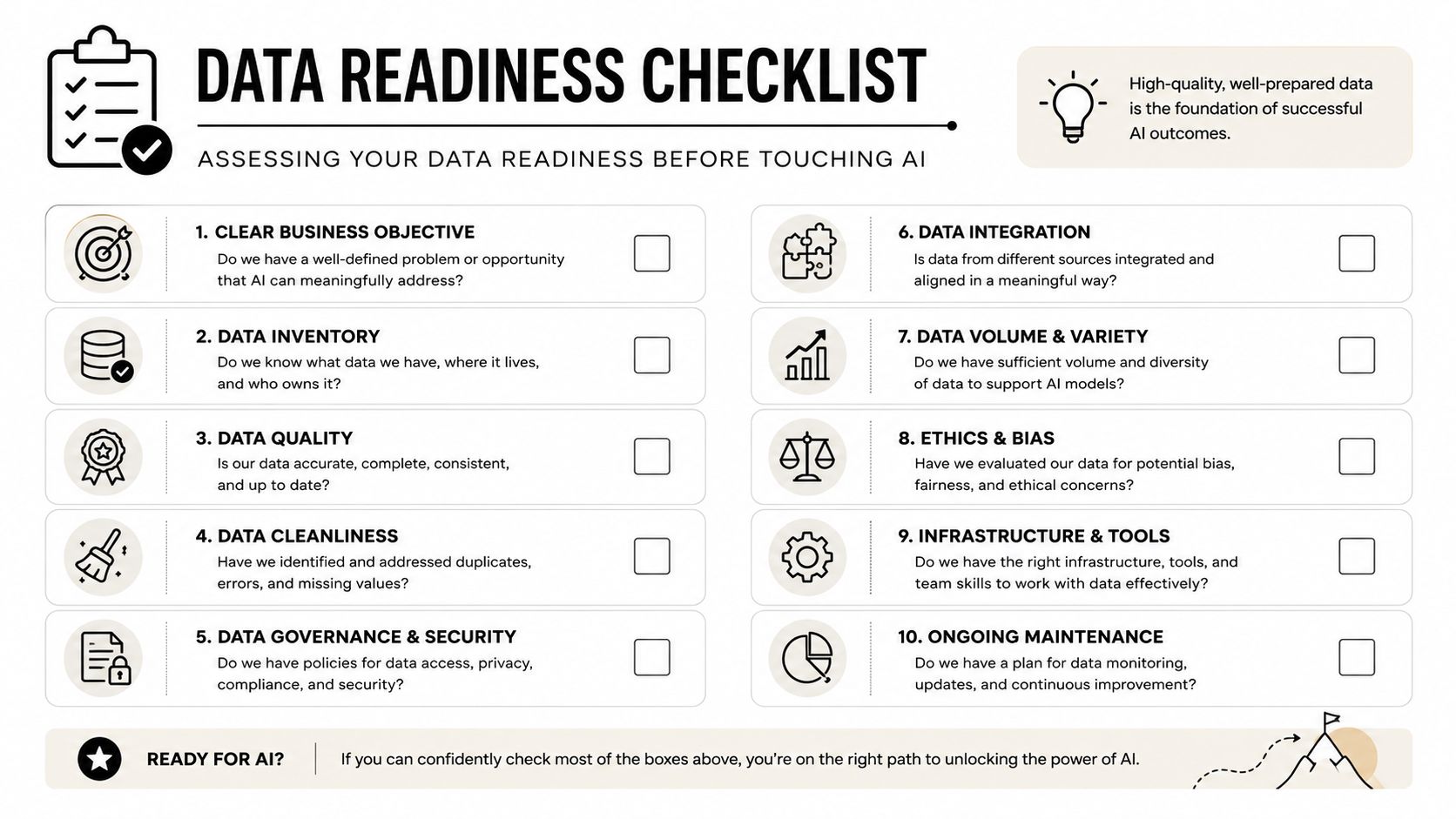
Start with the SKU truth, not the platform pitch
Before you compare tools, map every source of inventory data you have. For each SKU cluster, you need sales history, supplier lead times, and seasonal or promotional overlays, because those are the inputs that drive forecasting and replenishment recommendations implementation guide. If your records only go back a few months, or if item names change between systems, the model has nothing stable to learn from.
A Melbourne wholesaler I'd worry about would often find lead times recorded in three formats across three systems, one in days, one in weeks, one as free text in email notes. That kind of fragmentation doesn't just slow implementation, it makes the forecast unreliable. Data quality matters more than model sophistication, because a fancy model built on bad inputs will still give you bad stock decisions.
What readiness actually looks like
Use this as your working checklist:
Single source of truth: one inventory record set that matches across sales, purchasing, and warehouse workflows.
Consistent SKU naming: no duplicates, no rogue abbreviations, no “same item, different code” problem.
Verified lead times: supplier timing confirmed against actual receipts, not assumptions.
Documented seasonality: promotions, trading peaks, and recurring demand swings captured in one place.
Clean data doesn't need to be perfect. It needs to be consistent enough that the AI can see the pattern you already know exists.
This audit usually takes one to two weeks, and that's time well spent. Most SMEs skip it because they want the software win first, but the most impactful move is getting the inputs right before you automate the forecast. If your warehouse process is also messy, the internal guide on inventory control warehouse operations is a sensible companion read, because the AI layer can't fix broken receiving or stock discipline.
Choosing Between SaaS Platforms and Custom Build Solutions
For most Australian SMEs, the answer is boring and correct, use SaaS first. If you run a business with modest inventory complexity, a finance stack built on Xero or MYOB, and no dedicated data team, a custom build is usually a vanity project. The build path only starts to make sense when you have very large SKU counts, a complex supplier network, and staff who can maintain models without vendor dependence.
SaaS versus custom build
The right decision depends on control, speed, and how much technical debt you're willing to carry. If you want a clean framework for thinking through that choice, the build vs buy software framework is a useful external reference, but the commercial logic for inventory is simple. Buy when you need speed and predictability. Build only when your scale justifies the overhead.
Platform | Pricing Model | AI Forecasting Depth | ERP Integration | Australian Localisation | Best For |
|---|---|---|---|---|---|
Netstock | Subscription | Strong replenishment and forecasting focus | Connects to common ERP and accounting stacks | Suits AU operations that need practical inventory control | SMEs wanting fast setup and guided forecasting |
Cin7 Core | Subscription | Broad inventory workflow capability with forecasting support | Strong multi-system connectivity | Designed for AU selling and stock workflows | Retail and wholesale teams with multi-channel operations |
Zoho Inventory | Subscription | Lighter AI depth, good operational automation | Integrates across the Zoho ecosystem and common business tools | Practical for smaller AU businesses managing stock and orders | Smaller teams wanting affordability and simplicity |
For implementation planning, automating business processes gives a broader view of how inventory automation fits into a wider ops stack.
A custom build, using models such as LSTM for demand forecasting or XGBoost and Random Forest for short-horizon prediction, can be effective when you've got the volume and people to support it implementation guide. The catch is that custom systems need clean data pipelines, maintenance, validation, and ongoing tuning. That's why they're rarely the right starting point for an SME.
If your annual inventory spend is under a level that makes dedicated data staff worthwhile, a SaaS platform is usually the safer economic choice.
Don't ignore hidden SaaS costs either. Per-SKU pricing, integration fees, and monthly data-storage charges can inflate the total cost of ownership, so compare contracts on a three-year view, not just on the launch month.
Integrating AI Inventory With Your Existing Accounting and ERP Systems
AI should sit on top of your current ERP or warehouse system as an intelligence layer, not replace your transaction backbone. That approach keeps ordering, compliance, and accounting logic intact while the AI engine handles prediction and replenishment suggestions. It's the difference between a useful control tool and a fragile systems rewrite.
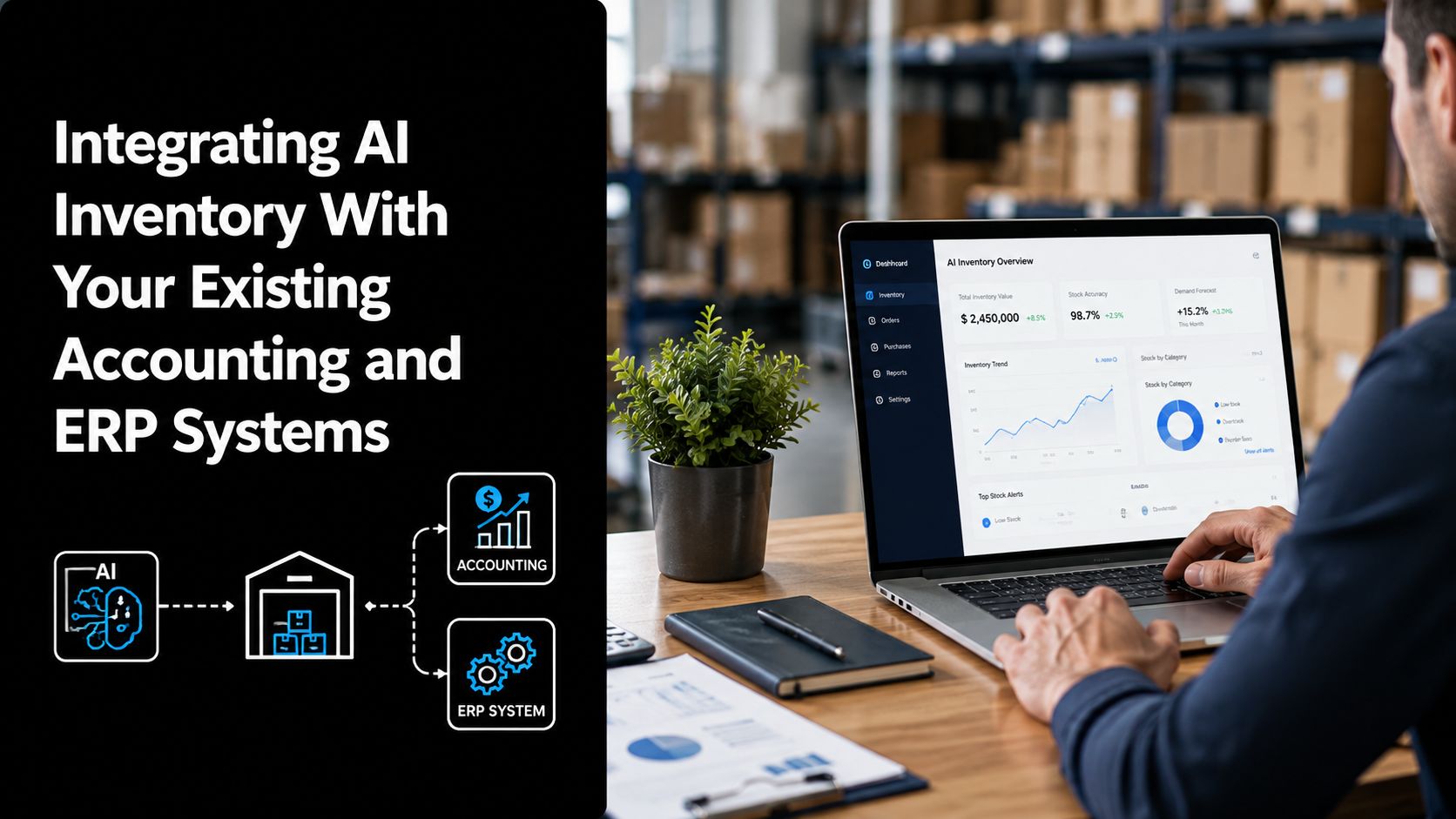
The integration flow that actually works
Start with your accounting platform, because that's usually where stock values, supplier records, and payment logic already live. The AI layer pulls historical sales data and supplier lead times, ingests POS signals for real-time demand, then sends replenishment recommendations back into the workflow for human approval. That's the core architecture used in the standard implementation playbooks implementation guide.
The three integration failures I see most often are predictable. Duplicate SKU entries appear when teams pull from multiple systems without a single item master. Bidirectional sync breaks between Xero and the AI layer when mapping rules aren't tested properly. Manual re-entry creeps back in when staff distrust the automation and start copying data from one screen to another.
Do this first: connect one system, usually accounting, validate the data flow for two weeks, then add POS or warehouse data only after the first feed is stable.
That staged approach also lines up with ecommerce inventory management practices, because online selling often exposes data mismatches quickly and brutally. Once the feeds are connected, maintain a single item master across all systems and set error alerts so your team knows when the AI can't reconcile a record automatically.
A lot of SMEs overbuild here. You don't need an elegant architecture diagram. You need a system that can ingest clean records, flag exceptions, and keep people in the loop when the data isn't trustworthy enough for automation.
Running a Focused Pilot and Calculating Real ROI
Don't roll AI across your whole catalogue on day one. Start with the SKU cluster where your forecasting is worst and your cash exposure is highest, then run the system in parallel with the current process for 60 to 90 days. That gives you a real comparison, not a hope.
Pick the right pilot, then measure the right things
The forecast model should be tested against current baseline performance before anyone makes a rollout decision. The standard validation method uses an 80/20 train-test split with holdout validation, which is the normal way to check whether the model performs beyond the data it was trained on implementation guide.
Track three things during the pilot:
Forecast accuracy: compare the AI forecast to your current baseline forecast.
Stockout frequency: count how often fast movers run out before and after.
Carrying cost by category: watch whether excess stock falls in the pilot group.
A Brisbane ecommerce business piloting AI on 150 SKUs is a useful working example. In the scenario supplied, it recorded a 38% improvement in forecast accuracy and a 22% reduction in carrying costs over 90 days. Those numbers aren't a promise, but they do show what disciplined testing can surface when the SKU group is well chosen and the data is clean.
Calculate ROI in cash terms
Use a simple internal model. Add the cash freed from reduced excess stock, the revenue recovered from fewer stockouts, and the labour time saved by automated replenishment recommendations. Then compare that total against setup fees, subscription costs, and internal staff time.
If the pilot doesn't show a cash or service-level gain in the target category, don't scale it. Fix the data, the SKU grouping, or the approval process first.
Run scenario tests on historical stockout periods before the pilot ends. That's the quickest way to see whether the model would have caught the demand spike earlier, without waiting for another bad trading month to prove the point.
Building Governance and Human Override Controls Into Your AI Workflow
The biggest mistake in AI inventory management is assuming the best system is the most autonomous one. It isn't. For Australian SMEs, value usually comes from cutting exception work while keeping the founder or operations lead firmly in control of the decisions that affect cash, service levels, and supplier relationships research paper.
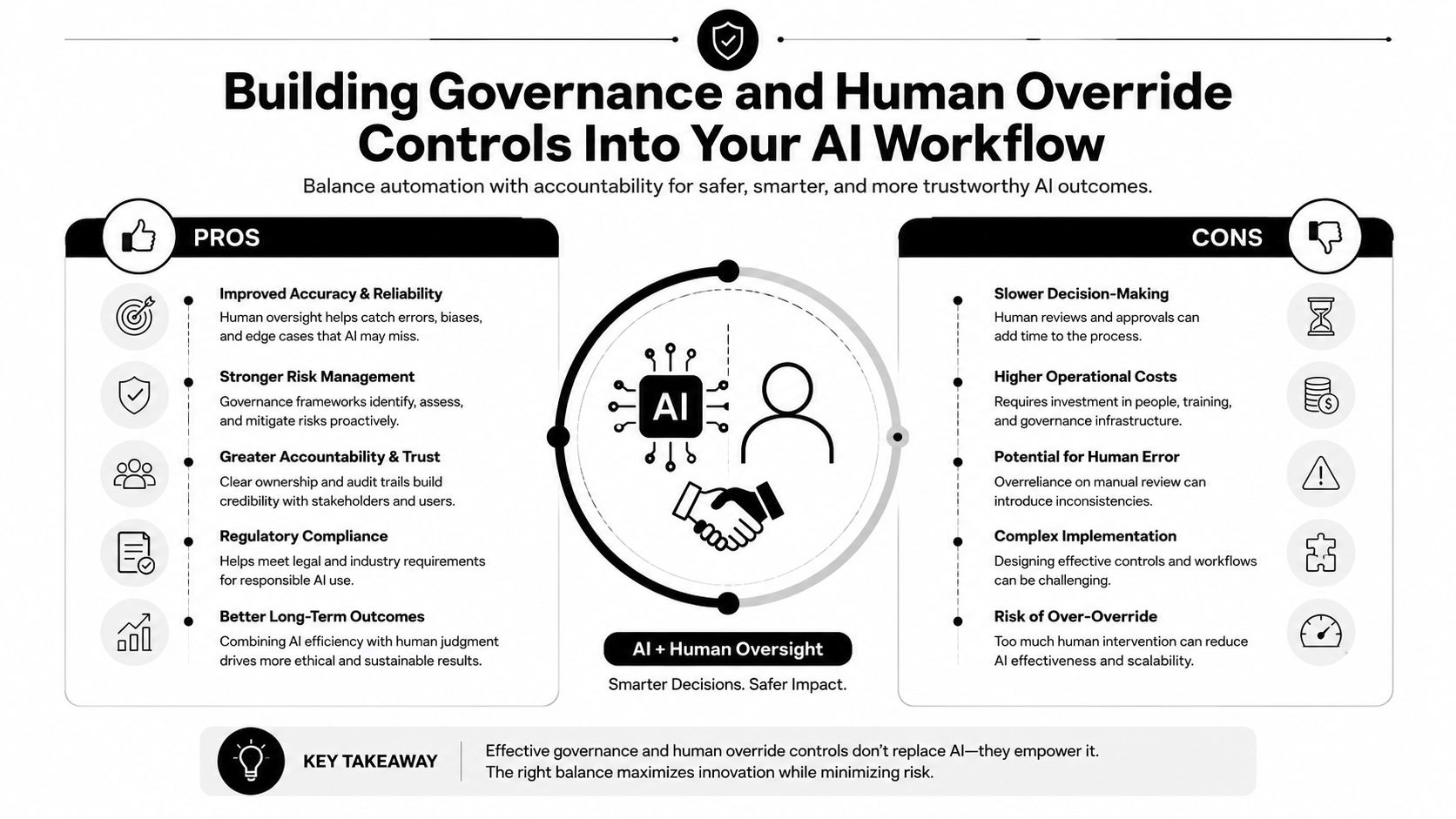
The three controls every SME needs
First, set approval thresholds. Routine replenishment can run automatically, but purchase orders above a defined dollar or margin threshold should require human sign-off. That keeps the system useful without letting it commit capital blindly.
Second, build exception management into the workflow. If the AI sees a demand spike, supplier delay, or margin compression event, it should flag the issue for review rather than acting on it automatically. That's where the human judgement matters most, because a bad assumption in stock planning can turn into a cash squeeze very quickly.
Third, insist on auditability. Every recommendation and every override needs a timestamp and a reason code. Without that trail, you can't learn from the system, and you can't defend the decision later if the numbers go wrong.
For a broader governance lens, the F1Group AI governance guide is a useful complement, especially if your business is already thinking about control frameworks beyond inventory.
Recent research on AI inventory adoption points to familiar barriers, high implementation costs, uncertain ROI, data quality issues, lack of staff knowledge, resistance to change, privacy concerns, and transparency concerns research paper. Those aren't abstract risks. They're the exact reasons governance matters.
What good control looks like
Baseline KPIs should be in place before the pilot starts. Review controls should be weekly at first, then tightened or relaxed based on exception volume. The founder should know exactly when to trust the system and exactly when to step in.
The best AI inventory setups are not the ones with the most automation. They're the ones where the owner has better control of the exceptions, better visibility into the stock profile, and fewer bad surprises.
Your Next Steps for Implementing AI Inventory Management
The roadmap is straightforward. Assess data readiness first, usually in one to two weeks, and don't move until the SKU master and lead times are clean enough to trust. Choose a SaaS platform unless you've got unusual scale or a dedicated data team. Integrate with accounting and ERP as an intelligence layer, not a system replacement.
Then run a focused pilot on one high-variance SKU group for 60 to 90 days, using forecast accuracy, stockouts, and carrying cost as the main measures. After that, build the ROI case, put approval thresholds and override controls in place, and scale only if the numbers hold up. The signal from broader supply-chain adoption is clear, 72% of large enterprises had deployed AI or machine learning in at least one supply-chain function by 2025, up from 45% in 2022 benchmark source. That doesn't mean SMEs should copy enterprise behaviour blindly, it means the tools are mature enough to use carefully.
If you're worried about cost, workflow disruption, or whether this is really for smaller businesses, don't. The answer is to start narrow, keep humans in control, and measure the cash effect properly. That's how you get the 25% to 35% average carrying cost reduction benchmark into the real world without blowing up operations benchmark source.
If you want a finance-first view of whether AI inventory management will improve cash flow in your business, Nexist can help you test the data, map the stock leaks, and build the business case before you spend a dollar on software. Book a 30-minute Business Scorecard call with Nexist and get a clear view of where inventory is tying up cash, where the process is breaking, and what the first practical step should be.
ai inventory management, Australian SMEs, inventory optimization, AI forecasting, stock management
" width="24px"/><g d="M 0 24.129 L 0 0.129 L 24 0.129 L 24 24.129 Z M 0 24.129 L 0 0.129 L 24 0.129 L 24 24.129 Z M 24 3 C 24 1.344 22.656 0 21 0 L 3 0 C 1.344 0 0 1.344 0 3 L 0 21 C 0 22.656 1.344 24 3 24 L 21 24 C 22.656 24 24 22.656 24 21 Z M 6.883 8.375 L 2.863 8.375 L 2.863 20.467 L 6.883 20.467 Z M 4.899 2.545 C 3.524 2.545 2.625 3.449 2.625 4.634 C 2.625 5.795 3.496 6.724 4.846 6.724 L 4.872 6.724 C 6.273 6.724 7.146 5.795 7.146 4.634 C 7.12 3.449 6.274 2.545 4.899 2.545 Z M 16.747 8.09 C 14.614 8.09 13.659 9.263 13.124 10.086 L 13.124 8.374 L 9.105 8.374 C 9.159 9.508 9.105 20.466 9.105 20.466 L 13.124 20.466 L 13.124 13.713 C 13.124 13.352 13.15 12.99 13.257 12.732 C 13.547 12.01 14.209 11.262 15.319 11.262 C 16.773 11.262 17.355 12.372 17.355 13.996 L 17.355 20.466 L 21.374 20.466 L 21.374 13.532 C 21.374 9.818 19.391 8.09 16.747 8.09 Z" fill="transparent" height="24.12890599668026px" id="dSFdkJotL" width="24px"><path d="M 0 24 L 0 0 L 24 0 L 24 24 Z" fill="transparent" height="24px" id="wscNJE44G" transform="translate(0 0.129)" width="24px"/><g d="M 0 24.129 L 0 0.129 L 24 0.129 L 24 24.129 Z M 24 3 C 24 1.344 22.656 0 21 0 L 3 0 C 1.344 0 0 1.344 0 3 L 0 21 C 0 22.656 1.344 24 3 24 L 21 24 C 22.656 24 24 22.656 24 21 Z M 6.883 8.375 L 2.863 8.375 L 2.863 20.467 L 6.883 20.467 Z M 4.899 2.545 C 3.524 2.545 2.625 3.449 2.625 4.634 C 2.625 5.795 3.496 6.724 4.846 6.724 L 4.872 6.724 C 6.273 6.724 7.146 5.795 7.146 4.634 C 7.12 3.449 6.274 2.545 4.899 2.545 Z M 16.747 8.09 C 14.614 8.09 13.659 9.263 13.124 10.086 L 13.124 8.374 L 9.105 8.374 C 9.159 9.508 9.105 20.466 9.105 20.466 L 13.124 20.466 L 13.124 13.713 C 13.124 13.352 13.15 12.99 13.257 12.732 C 13.547 12.01 14.209 11.262 15.319 11.262 C 16.773 11.262 17.355 12.372 17.355 13.996 L 17.355 20.466 L 21.374 20.466 L 21.374 13.532 C 21.374 9.818 19.391 8.09 16.747 8.09 Z" fill="transparent" height="24.12890599668026px" id="sTpjGo1tb" width="24px"><path d="M 0 24 L 0 0 L 24 0 L 24 24 Z" fill="transparent" height="24px" id="s7ffpmKOD" transform="translate(0 0.129)" width="24px"/><g d="M 24 3 C 24 1.344 22.656 0 21 0 L 3 0 C 1.344 0 0 1.344 0 3 L 0 21 C 0 22.656 1.344 24 3 24 L 21 24 C 22.656 24 24 22.656 24 21 Z M 6.883 8.375 L 2.863 8.375 L 2.863 20.467 L 6.883 20.467 Z M 4.899 2.545 C 3.524 2.545 2.625 3.449 2.625 4.634 C 2.625 5.795 3.496 6.724 4.846 6.724 L 4.872 6.724 C 6.273 6.724 7.146 5.795 7.146 4.634 C 7.12 3.449 6.274 2.545 4.899 2.545 Z M 16.747 8.09 C 14.614 8.09 13.659 9.263 13.124 10.086 L 13.124 8.374 L 9.105 8.374 C 9.159 9.508 9.105 20.466 9.105 20.466 L 13.124 20.466 L 13.124 13.713 C 13.124 13.352 13.15 12.99 13.257 12.732 C 13.547 12.01 14.209 11.262 15.319 11.262 C 16.773 11.262 17.355 12.372 17.355 13.996 L 17.355 20.466 L 21.374 20.466 L 21.374 13.532 C 21.374 9.818 19.391 8.09 16.747 8.09 Z" fill="transparent" height="24.000006px" id="D0ecaHEcW" transform="translate(0 0)" width="24px"><path d="M 24 3 C 24 1.344 22.656 0 21 0 L 3 0 C 1.344 0 0 1.344 0 3 L 0 21 C 0 22.656 1.344 24 3 24 L 21 24 C 22.656 24 24 22.656 24 21 Z" fill="rgb(55, 184, 218)" height="24.000006px" id="IPLFE6zXx" width="24px"/><path d="M 4.02 0 L 0 0 L 0 12.092 L 4.02 12.092 Z" fill="rgb(255, 255, 255)" height="12.09201px" id="FWhtzAyuY" transform="translate(2.863 8.375)" width="4.02px"/><path d="M 2.274 0 C 0.899 0 0 0.904 0 2.089 C 0 3.25 0.871 4.179 2.221 4.179 L 2.247 4.179 C 3.648 4.179 4.521 3.25 4.521 2.089 C 4.495 0.904 3.649 0 2.274 0 Z" fill="rgb(255, 255, 255)" height="4.17876px" id="VmOsKv4kO" transform="translate(2.625 2.545)" width="4.52095px"/><path d="M 7.641 0 C 5.509 0 4.554 1.173 4.019 1.996 L 4.019 0.284 L 0 0.284 C 0.053 1.419 0 12.376 0 12.376 L 4.019 12.376 L 4.019 5.623 C 4.019 5.262 4.045 4.9 4.151 4.642 C 4.442 3.92 5.103 3.172 6.214 3.172 C 7.667 3.172 8.25 4.282 8.25 5.907 L 8.25 12.376 L 12.269 12.376 L 12.269 5.442 C 12.269 1.728 10.286 0 7.641 0 Z" fill="rgb(255, 255, 255)" height="12.37626px" id="n1XUbhaq0" transform="translate(9.105 8.09)" width="12.268830000000001px"/></g></g></g></g></svg>)