Accounts Payable Automation Australia: SME Guide 2026
Discover practical guidance for accounts payable automation australia in 2026. Choose software, streamline workflows, ensure GST/BAS compliance, & boost cash
Ansh Malhotra
You're probably dealing with some version of this already. Supplier invoices land in three inboxes, a few PDFs sit in someone's Downloads folder, one manager approves by email, another by Teams, and finance still has to key everything into Xero or MYOB before the payment run goes out. Then BAS is due, GST coding needs checking, and you still don't have a clean view of what's payable this week versus next month.
That's why accounts payable automation in Australia matters. For most SMEs, this isn't a software story first. It's a cash-flow control story. Done well, AP automation gives you cleaner liability data, tighter approval discipline, and fewer surprises in the bank account. Done badly, it just helps you push invoices through faster while keeping the same weak controls underneath.
For founders, the practical question isn't whether automation sounds efficient. It's whether your AP process can help you protect cash, stay audit-ready, and make better payment decisions without adding admin.
Table of Contents
The Real Cost of Manual Accounts Payable for Aussie SMEs
It is 4:30 on a Thursday. Payroll is due tomorrow, BAS is coming up, and a supplier is on the phone asking why their invoice has not been paid. Your team has the invoice. It is sitting in someone's inbox, coded differently from the last three bills from the same supplier, and no one can say with confidence what your committed cash position looks like today.
That is the point where manual AP stops being back-office admin and starts affecting cash decisions, supplier trust, and compliance.
Why manual AP hurts cash control, not just productivity
Analysts at Factura found that manual AP processing averages around US$15 per invoice and takes 14.6 days, while fully automated teams can process over 23,000 invoices per employee annually compared with about 6,000 in manual setups. For an SME, the headline is not speed alone. It is what slow, inconsistent processing does to forecasting and risk.
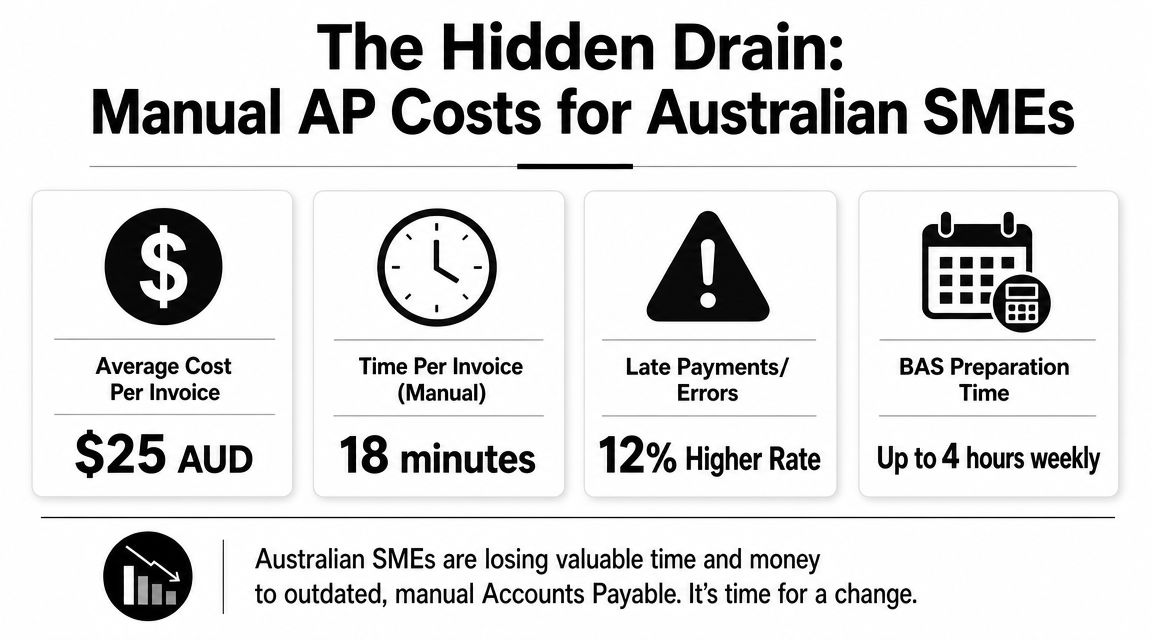
In Australian businesses, the cost usually shows up in four places founders notice fast:
Cash visibility weakens. Approved, unapproved, and disputed invoices sit in different places, so payment runs become guesswork instead of planned cash management.
GST errors show up late. If coding is inconsistent, BAS preparation turns into a cleanup exercise and input tax credits are harder to review with confidence.
Approval risk increases. Verbal approvals, forwarded emails, and ad hoc payment requests make it easier to miss policy breaches or pay the same invoice twice.
Supplier terms lose value. You cannot use agreed terms properly if you do not have a reliable view of due dates, disputes, and early payment options.
For project-based firms, the problem runs deeper. If invoices are not coded cleanly to jobs, cost centres, or entities, margin reporting suffers as well. Businesses comparing finance systems often see this first in their job-costing process, which is why project accounting software for Australian businesses often becomes part of the same finance improvement conversation.
A lot of AP discussions stay at the level of OCR and data entry. That misses the commercial issue.
Manual AP hides liabilities until they become urgent.
If you want a useful primer on the mechanics behind digitised invoice handling, this guide to accounts payable automation is a solid companion read. Founders still need to convert those mechanics into tighter control over payment timing, GST treatment, and approval discipline.
What changes when AP is treated as a finance control
The main gain from AP automation is not fewer keystrokes. It is a cleaner decision-making process around who approves spend, when cash leaves the bank, and how accurately liabilities appear before month end.
That matters in Australia because AP sits close to several finance pressure points at once. GST coding affects BAS. Payment timing affects working capital. Supplier records and approval histories affect auditability. If those controls live in inboxes and spreadsheets, finance spends too much time fixing exceptions after the fact.
The shift looks like this:
Manual AP habit | Better automated outcome |
|---|---|
Invoices sit in email threads | Invoices move through a visible workflow with status, owner, and due date |
GST is checked late | Coding rules are applied earlier and exceptions are reviewed before BAS prep |
Payment runs are reactive | Payment dates can be matched to cash position, supplier terms, and approval status |
Founders approve ad hoc | Delegations are consistent, auditable, and easier to enforce |
There are trade-offs. Automation does not remove the need for judgment. Someone still needs to decide how GST should be treated on edge cases, who can approve what, and when it makes sense to hold cash rather than pay early. But with a controlled AP process, those become deliberate decisions instead of last-minute fixes.
For inventory-heavy and multi-entity SMEs, that difference is material. Every payment competes with stock purchases, wages, tax, and debt obligations. Better AP control gives finance a current view of liabilities, helps preserve supplier relationships, and reduces the chance of finding out too late that cash has already been committed elsewhere.
Choosing Your AP Automation Platform
The wrong way to choose AP software is to start with feature checklists and pricing tables. The right way is to start with your finance stack, your approval structure, and the exceptions that already cause pain.
If the platform can't fit how your business buys, codes, approves, and pays, the demo won't matter.
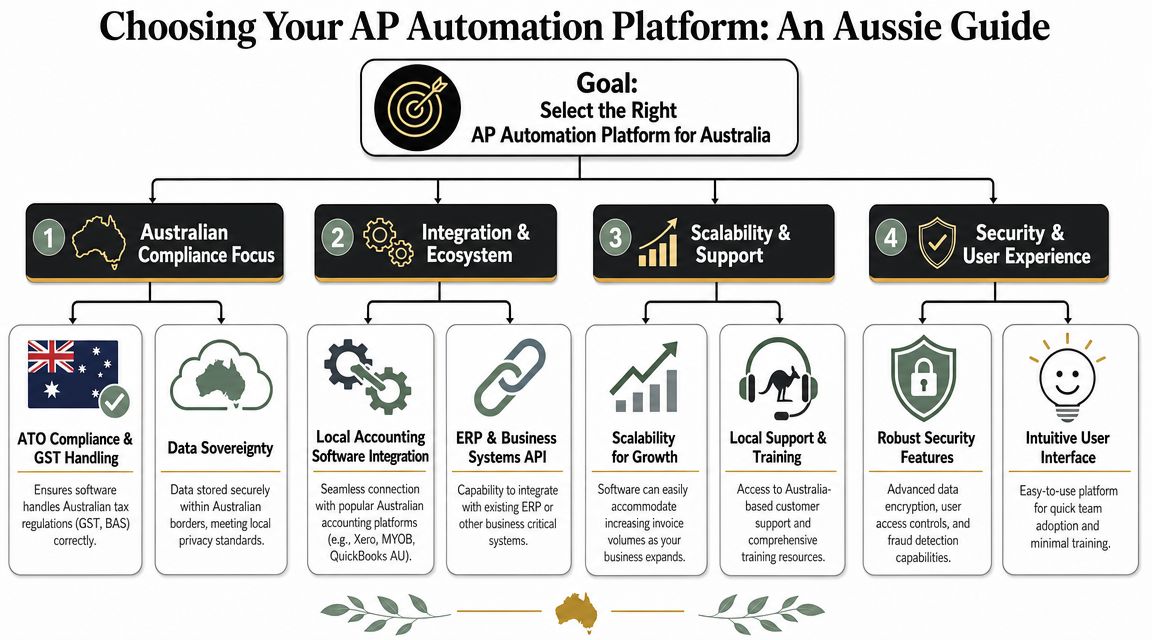
Start with integration, not features
In the Australian market, the strongest AP setups are the ones that connect closely with the accounting system already running the business. Real-time sync with platforms such as Xero, MYOB, and NetSuite removes manual re-entry and gives finance a live view of invoice and payment status, which is why this Australia-focused AP automation analysis treats integration as a core source of value.
That means your first screening questions should be practical:
Ledger fit. Does it sync cleanly with your current accounting platform, including supplier records, chart of accounts, tracking categories, and payment status?
GST handling. Can your team apply and review Australian GST treatment inside the workflow instead of fixing coding after export?
Multi-entity support. If you've got more than one ABN, cost structure, or trading entity, can the platform route and post correctly?
Payment workflow compatibility. Will it support the way you execute local payment runs and approvals now, or the way you want to execute them later?
A lot of founders also need the AP decision to sit inside a broader systems clean-up. If project costing, job profitability, or departmental coding is still messy, the AP platform won't solve that by itself. That's where adjacent systems matter, including tools used for project accounting software decisions.
Buy for the exceptions, not the happy path. Every platform can process a clean PDF from a regular supplier.
Questions to take into demos
Don't ask vendors whether they have “good workflows”. Ask them to show your workflow.
Use a short demo scorecard like this:
Show me an invoice from receipt to payment
Ask how an invoice enters the system, how data is captured, who reviews it, and what syncs to your accounting platform.Show me GST review and exception handling
This matters more than a polished dashboard. You need to know what happens when a supplier sends an incomplete invoice or coding needs intervention.Show me approval rules by threshold and entity
If your delegation changes by dollar value, department, or business unit, the platform should reflect that without workarounds.Show me audit history
You want to see who changed coding, who approved, who released payment, and when.Show me supplier onboarding
If the vendor has no clear answer here, expect a lot of manual exceptions later.
For a technical overview of OCR and AI-led invoice capture, Zenfox AI automation for invoices is a useful reference. Just keep the hierarchy straight. Capture quality matters, but workflow control and integration matter more.
A final selection tip. If you're deciding between a lightweight capture tool and a broader finance process redesign, choose the option that fixes your operating model, not just your data entry.
Designing Your New Automated AP Workflow
Software doesn't create a clean AP process. It exposes whether you have one.
Most failed implementations don't fail because OCR is weak. They fail because invoices still arrive through five channels, approval rules live in people's heads, and one person can change supplier details, approve invoices, and release payments. Automation only makes that mess move faster.
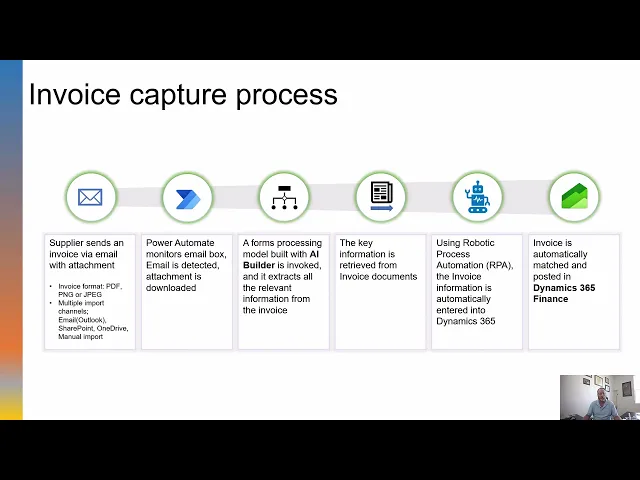
To visualise the end state, use this workflow as the reference point:
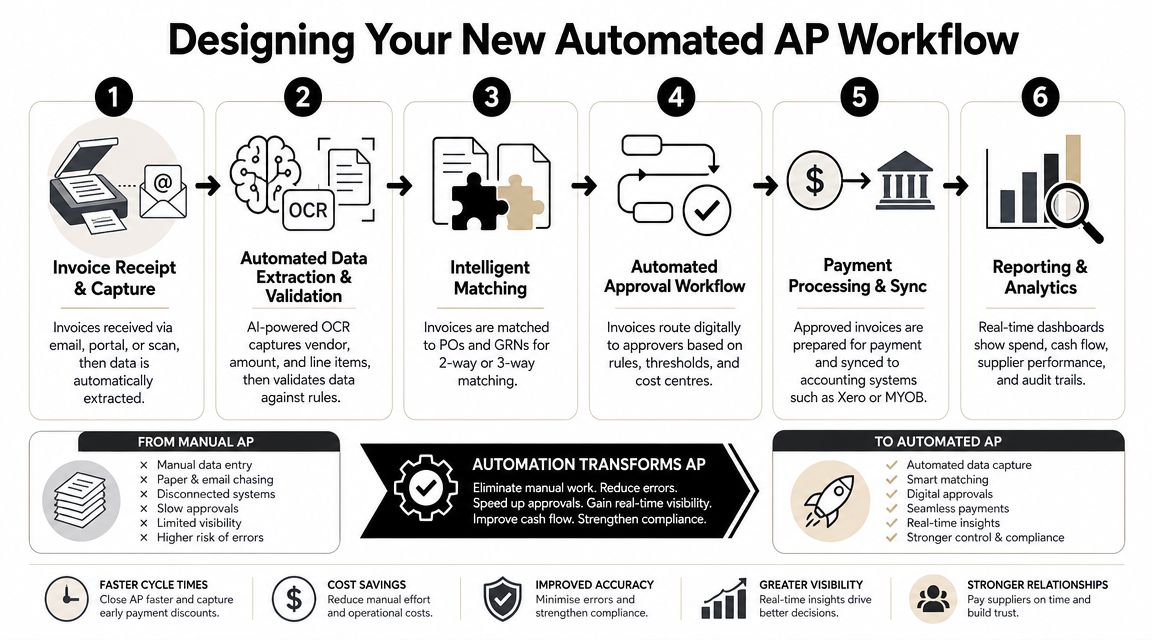
Build one controlled intake point
Best-practice AP automation starts by concentrating invoice receipt into a single channel, then layering data extraction, ERP integration, and rule-based routing on top, with clear separation between approval, payment authorisation, payment execution, and master data management, according to Vic.ai's AP best-practice guide.
For most SMEs, the first design decision is simple. Stop letting invoices arrive anywhere and everywhere.
A controlled intake model usually includes:
One primary channel. A dedicated AP email address, supplier portal, EDI/XML feed, or purchase-to-pay platform.
Supplier communication standards. Clear instructions on invoice format, required references, and where documents must be sent.
Exception handling rules. A defined path for invoices missing PO numbers, entity details, or supporting documentation.
If you skip this step, everything downstream becomes harder. OCR accuracy drops, duplicate detection gets weaker, and approvers waste time deciding whether the invoice should even be in the system.
Here's the simple rule I'd apply in most founder-led businesses. If a supplier sends invoices to personal inboxes, the process isn't automated yet.
Set approval logic before you switch on automation
Approval design is where cash control starts. Not at payment.
A good workflow uses approval thresholds and routing logic that reflect how your business spends money. Low-value, low-risk invoices can move quickly. Higher-value items, unusual vendors, or non-PO purchases should trigger more scrutiny.
That usually means mapping decisions such as:
Invoice type | Suggested workflow question |
|---|---|
Recurring supplier invoice | Can this be auto-routed to the budget owner? |
PO-backed stock purchase | Does it match the PO and receipt status? |
Non-PO service invoice | Who confirms it was genuinely received and budgeted? |
High-value or unusual invoice | Which second approver or finance review is required? |
Practical rule: Don't build approvals around job titles alone. Build them around risk, value, and whether the invoice matches a known purchasing event.
When founders stay in every approval step, automation stalls. When founders are removed entirely, control weakens. The middle ground is to reserve senior review for exceptions, threshold breaches, and sensitive payments.
The same goes for GST and BAS readiness. You want coding decisions to happen inside the workflow, near the invoice, with a visible audit trail. If your team is exporting invoice data first and cleaning up tax treatment later, you're creating rework.
For teams that want a walkthrough of the moving parts, this short video gives a useful overview of what an automated AP flow looks like in practice.
Separate duties even in a small team
Many SMEs become uncomfortable here, because the same few people often wear multiple hats.
But segregation of duties doesn't require a large finance department. It requires intentional design.
You should separate these functions as much as practical:
Invoice approval
The person who confirms the expense is valid and received.Payment authorisation
The person who decides it should be included in the payment run.Payment execution
The person who uploads or releases the bank payment.Supplier master data changes
The person who can create or amend banking and vendor records.
In a small business, one person may still perform more than one role. The safeguard then shifts to compensating controls. That can mean dual approval over certain thresholds, restricted access rights, or owner review of supplier master data changes.
What doesn't work is pretending software approval alone solves fraud risk. It doesn't. If one user can edit bank details and also release payment, your process is still exposed.
The strongest AP workflows are boring in the best way. Invoices arrive predictably, exceptions surface quickly, and payment decisions happen on purpose.
Your Implementation Roadmap and Checklist
AP automation projects go wrong when businesses try to “turn on the tool” before they've made process decisions. A smooth rollout is less about speed and more about sequence.
The practical risk is bigger now because control design matters more. Budgetly notes that millions of Australians, including around 2.6 million small businesses, were affected by the 2022-23 and 2023-24 data breaches involving tax, super, and business data, which is why founders need to think about approval rules, segregation of duties, and duplicate-payment risk, not just faster processing, as discussed in Budgetly's AP automation article.
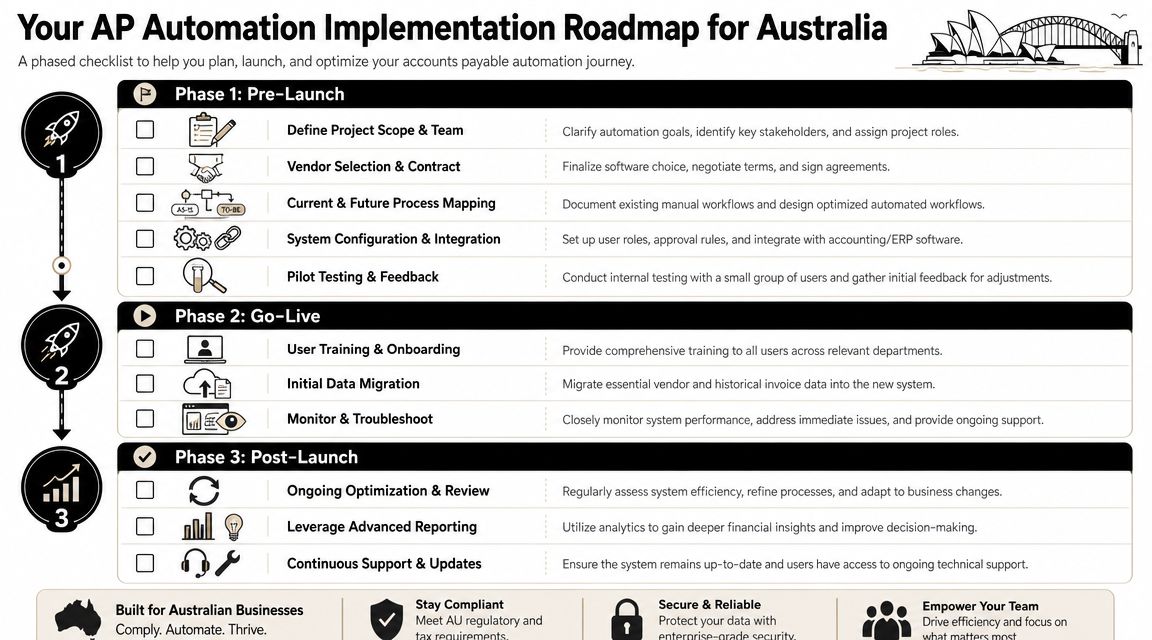
Pre-launch decisions that prevent messy rollouts
Before go-live, lock down the operating model.
Use a pre-launch checklist like this:
Define scope tightly. Start with one entity, one invoice stream, or one supplier group if your current process is messy.
Map your current pain points. Note where invoices get lost, where coding is inconsistent, and where approvals stall.
Clean supplier data. Standardise supplier names, payment terms, and banking details before migration.
Set authority rules. Write down who can approve what, who can release payments, and who owns vendor changes.
Include the right people early. Finance, procurement, IT, and operational approvers all need input before configuration starts.
A lot of founders underestimate the human side here. If approvers don't trust the routing logic, they'll bypass it. If suppliers keep sending invoices to old addresses, automation rates stay low.
Go-live without breaking the finance function
The safest go-live is controlled, not dramatic.
Run a pilot with a limited invoice set first. Watch what happens to approval turnaround, exception handling, coding accuracy, and export to the ledger. Then fix edge cases before you expand scope.
A practical go-live sequence often looks like this:
Train users by role
AP staff need workflow mastery. Approvers need fast decision paths. Founders need exception visibility, not full-system detail.Pilot real invoices
Don't rely on dummy documents. Use actual supplier invoices with the normal mix of clean and messy cases.Migrate only what's needed
Bring across active suppliers and essential historical context. Avoid bloated migrations that slow adoption.Set up a support channel
Give staff a clear place to report issues during the first few weeks.
The first month after launch is still part of implementation. Treat it that way.
If the rollout sits inside a wider finance clean-up, some businesses also bring in outside oversight through a virtual chief financial officer model to help align controls, system design, and cash management. That can be useful when AP changes affect purchasing, inventory, and reporting, not just bookkeeping.
What to tighten after launch
Post-launch work is where significant gains show up.
Focus on three areas first:
Supplier onboarding
Push suppliers towards the approved channel and invoice format. If you tolerate old habits, exceptions will keep flooding back in.Approval discipline
Review where invoices stall. A workflow that looks clean on paper can still bottleneck if thresholds or owners are wrong.Access and controls
Recheck user permissions after go-live. Staff often get broader access during setup than they should keep long term.
The rollout is successful when the process becomes routine. AP should no longer depend on who remembers what. It should run through the system, with exceptions visible and controlled.
Measuring Success with the Right KPIs
Once AP automation is live, the basic question is whether the process got faster. The better question is whether it improved decision-making.
Those aren't the same thing.
Track process health and cash outcomes separately
I'd split AP metrics into two groups. Process metrics tell you whether the workflow is functioning. Cash metrics tell you whether finance is using the new visibility well.
Start with process health:
Invoice cycle time. Measure how long invoices take from receipt to approved payment status.
Exception rate. Track how many invoices need manual intervention because of missing data, unclear coding, or approval issues.
Approval bottlenecks. Review which approvers or cost centres create delays.
Duplicate and anomaly reviews. Monitor how often the system flags issues and how quickly they're resolved.
Touchless processing share. Look at how much volume moves through the standard workflow without manual fixes.
Then track cash outcomes:
KPI | Why it matters |
|---|---|
Payment timing by supplier | Shows whether you're paying by plan or by panic |
Early-payment discount capture | Reveals whether finance is using visibility to save cash where terms allow |
Days Payable Outstanding | Helps manage working capital without damaging supplier trust |
Forecast accuracy for payables | Tests whether liability data is feeding your short-term cash forecast properly |
If your monthly review process is weak, the value of AP automation will fade. That's why these numbers need to sit inside a broader management rhythm such as a quarterly business review, not just an AP team dashboard.
For inventory-heavy businesses, connect AP to planning
For Australian businesses carrying significant stock, AP automation becomes more valuable when it supports payment planning against inventory decisions. OFX's Australia-focused guide argues that its greatest value is realised when AP liability data informs when to pay suppliers, how to preserve Days Payable Outstanding, and how to avoid funding slow-moving stock with expensive debt in tighter financing conditions, while noting ABS reported business inventories rose 3.6% in trend terms in the March quarter 2025, as covered in OFX's AP software guide for Australia.
That means AP KPIs shouldn't live in isolation.
Review them alongside:
Stock purchasing plans
Supplier terms
Upcoming BAS and payroll dates
Expected collections from customers
Short-term funding pressure
If your AP data is current and reliable, you can decide whether to pay early, on term, or hold cash for a more urgent use. That's the difference between a faster AP process and a smarter finance function.
Common AP Automation Pitfalls to Avoid
Most AP automation problems are management problems wearing a software costume.
The tool usually works. The business just hasn't made the operating decisions needed to get value from it.
The project mistakes that show up later
A few patterns come up again and again.
Buying on licence price alone
Cheap software becomes expensive when integration is shallow, approvals are clunky, or finance still has to clean up GST and coding outside the workflow.Automating bad intake habits
If invoices still arrive through scattered channels, the platform becomes a second inbox rather than a control layer.Ignoring supplier behaviour
Suppliers have to use the new path. If they keep emailing account managers or sales staff, exceptions won't fall.Leaving approvals too broad
When everyone can approve too much, no one owns spending properly.Treating AP as a finance-only project
Procurement, operations, and IT all affect success. If they're not involved, workflow design usually misses real-world exceptions.
For a broader perspective on refining process design after implementation, this piece on optimizing accounts payable workflows is worth reading alongside your own internal review.
Good AP automation reduces effort. Great AP automation reduces ambiguity.
Why AP automation needs ongoing ownership
The biggest mistake is the set-and-forget mindset.
Approval thresholds drift out of date. New suppliers enter without standardisation. Teams change. Business units get added. Then the system that looked clean at launch slowly fills with manual workarounds.
A resilient AP process needs regular review. Not a major project every quarter. Just ownership.
Review these items routinely:
Approval rules still fit the business
User access still matches roles
Suppliers are using the correct channels
Exceptions are being reduced, not normalised
AP data is feeding cash forecasting properly
If you're a founder, that doesn't mean you need to sit inside AP every day. It means someone needs authority to own the workflow, challenge bad habits, and keep the process aligned with how the business buys and pays.
Accounts payable automation in Australia works best when you treat it as part of your cash system, your control environment, and your operating cadence. Not just another app in the finance stack.
If you want help turning AP from a manual admin burden into a cleaner cash-flow and control system, Nexist works with Australian SMEs on finance process design, forecasting, and practical implementation. The focus is straightforward: tighter visibility, stronger controls, and more time back for the owner and finance team.
accounts payable automation australia, ap automation, small business finance, xero automation, cash flow management

" width="24px"/><g d="M 0 24.129 L 0 0.129 L 24 0.129 L 24 24.129 Z M 0 24.129 L 0 0.129 L 24 0.129 L 24 24.129 Z M 24 3 C 24 1.344 22.656 0 21 0 L 3 0 C 1.344 0 0 1.344 0 3 L 0 21 C 0 22.656 1.344 24 3 24 L 21 24 C 22.656 24 24 22.656 24 21 Z M 6.883 8.375 L 2.863 8.375 L 2.863 20.467 L 6.883 20.467 Z M 4.899 2.545 C 3.524 2.545 2.625 3.449 2.625 4.634 C 2.625 5.795 3.496 6.724 4.846 6.724 L 4.872 6.724 C 6.273 6.724 7.146 5.795 7.146 4.634 C 7.12 3.449 6.274 2.545 4.899 2.545 Z M 16.747 8.09 C 14.614 8.09 13.659 9.263 13.124 10.086 L 13.124 8.374 L 9.105 8.374 C 9.159 9.508 9.105 20.466 9.105 20.466 L 13.124 20.466 L 13.124 13.713 C 13.124 13.352 13.15 12.99 13.257 12.732 C 13.547 12.01 14.209 11.262 15.319 11.262 C 16.773 11.262 17.355 12.372 17.355 13.996 L 17.355 20.466 L 21.374 20.466 L 21.374 13.532 C 21.374 9.818 19.391 8.09 16.747 8.09 Z" fill="transparent" height="24.12890599668026px" id="dSFdkJotL" width="24px"><path d="M 0 24 L 0 0 L 24 0 L 24 24 Z" fill="transparent" height="24px" id="wscNJE44G" transform="translate(0 0.129)" width="24px"/><g d="M 0 24.129 L 0 0.129 L 24 0.129 L 24 24.129 Z M 24 3 C 24 1.344 22.656 0 21 0 L 3 0 C 1.344 0 0 1.344 0 3 L 0 21 C 0 22.656 1.344 24 3 24 L 21 24 C 22.656 24 24 22.656 24 21 Z M 6.883 8.375 L 2.863 8.375 L 2.863 20.467 L 6.883 20.467 Z M 4.899 2.545 C 3.524 2.545 2.625 3.449 2.625 4.634 C 2.625 5.795 3.496 6.724 4.846 6.724 L 4.872 6.724 C 6.273 6.724 7.146 5.795 7.146 4.634 C 7.12 3.449 6.274 2.545 4.899 2.545 Z M 16.747 8.09 C 14.614 8.09 13.659 9.263 13.124 10.086 L 13.124 8.374 L 9.105 8.374 C 9.159 9.508 9.105 20.466 9.105 20.466 L 13.124 20.466 L 13.124 13.713 C 13.124 13.352 13.15 12.99 13.257 12.732 C 13.547 12.01 14.209 11.262 15.319 11.262 C 16.773 11.262 17.355 12.372 17.355 13.996 L 17.355 20.466 L 21.374 20.466 L 21.374 13.532 C 21.374 9.818 19.391 8.09 16.747 8.09 Z" fill="transparent" height="24.12890599668026px" id="sTpjGo1tb" width="24px"><path d="M 0 24 L 0 0 L 24 0 L 24 24 Z" fill="transparent" height="24px" id="s7ffpmKOD" transform="translate(0 0.129)" width="24px"/><g d="M 24 3 C 24 1.344 22.656 0 21 0 L 3 0 C 1.344 0 0 1.344 0 3 L 0 21 C 0 22.656 1.344 24 3 24 L 21 24 C 22.656 24 24 22.656 24 21 Z M 6.883 8.375 L 2.863 8.375 L 2.863 20.467 L 6.883 20.467 Z M 4.899 2.545 C 3.524 2.545 2.625 3.449 2.625 4.634 C 2.625 5.795 3.496 6.724 4.846 6.724 L 4.872 6.724 C 6.273 6.724 7.146 5.795 7.146 4.634 C 7.12 3.449 6.274 2.545 4.899 2.545 Z M 16.747 8.09 C 14.614 8.09 13.659 9.263 13.124 10.086 L 13.124 8.374 L 9.105 8.374 C 9.159 9.508 9.105 20.466 9.105 20.466 L 13.124 20.466 L 13.124 13.713 C 13.124 13.352 13.15 12.99 13.257 12.732 C 13.547 12.01 14.209 11.262 15.319 11.262 C 16.773 11.262 17.355 12.372 17.355 13.996 L 17.355 20.466 L 21.374 20.466 L 21.374 13.532 C 21.374 9.818 19.391 8.09 16.747 8.09 Z" fill="transparent" height="24.000006px" id="D0ecaHEcW" transform="translate(0 0)" width="24px"><path d="M 24 3 C 24 1.344 22.656 0 21 0 L 3 0 C 1.344 0 0 1.344 0 3 L 0 21 C 0 22.656 1.344 24 3 24 L 21 24 C 22.656 24 24 22.656 24 21 Z" fill="rgb(55, 184, 218)" height="24.000006px" id="IPLFE6zXx" width="24px"/><path d="M 4.02 0 L 0 0 L 0 12.092 L 4.02 12.092 Z" fill="rgb(255, 255, 255)" height="12.09201px" id="FWhtzAyuY" transform="translate(2.863 8.375)" width="4.02px"/><path d="M 2.274 0 C 0.899 0 0 0.904 0 2.089 C 0 3.25 0.871 4.179 2.221 4.179 L 2.247 4.179 C 3.648 4.179 4.521 3.25 4.521 2.089 C 4.495 0.904 3.649 0 2.274 0 Z" fill="rgb(255, 255, 255)" height="4.17876px" id="VmOsKv4kO" transform="translate(2.625 2.545)" width="4.52095px"/><path d="M 7.641 0 C 5.509 0 4.554 1.173 4.019 1.996 L 4.019 0.284 L 0 0.284 C 0.053 1.419 0 12.376 0 12.376 L 4.019 12.376 L 4.019 5.623 C 4.019 5.262 4.045 4.9 4.151 4.642 C 4.442 3.92 5.103 3.172 6.214 3.172 C 7.667 3.172 8.25 4.282 8.25 5.907 L 8.25 12.376 L 12.269 12.376 L 12.269 5.442 C 12.269 1.728 10.286 0 7.641 0 Z" fill="rgb(255, 255, 255)" height="12.37626px" id="n1XUbhaq0" transform="translate(9.105 8.09)" width="12.268830000000001px"/></g></g></g></g></svg>)