
Invoice Automation: A Practical Guide for Australian SMEs
Learn what invoice automation is, how it cuts AP costs, and the roadmap Australian SMEs use to integrate invoicing with ERP, accounting and cash-flow systems.
Ansh Malhotra

Australia processes more than 1.2 billion invoices each year, yet around 90% of invoice processing remains fully or partly manual, according to the Australian Taxation Office's eInvoicing guidance. That gap changes the invoice automation conversation. The opportunity isn't just to reduce data entry or make accounts payable less tedious. It's to gain control over when liabilities are recognised, when suppliers are paid, how GST information reaches the BAS process, and where cash leaks out of the business.
Australian SMEs are also operating in a market where eInvoicing is moving from an optional improvement to an expected capability. The Commonwealth has already used Peppol eInvoicing policy to push faster processing, stronger payment governance and more measurable adoption. A finance team that automates only invoice capture may save effort, but a team that designs the full workflow can improve cash visibility, approval discipline and payment timing.
Table of Contents
What Invoice Automation Actually Means
Invoice automation is the software-assisted process of capturing, validating, approving, posting and reconciling supplier invoices with minimal manual keying. It can handle paper documents after scanning, PDFs received by email, supplier portal submissions and structured Peppol eInvoices. The system extracts fields such as supplier details, invoice number, dates, line items, GST and totals, then applies rules before sending the invoice to the right person or accounting system.
That definition matters because many vendors sell invoice automation as an OCR upgrade. OCR is useful, but it only solves the first handoff. A PDF can be read accurately and still be paid late, coded incorrectly, approved by the wrong person or entered twice. The value appears when the captured information drives a controlled process from receipt through payment and reconciliation.
Treat AP as a cash-flow control surface
A properly designed workflow gives the finance team earlier visibility of upcoming obligations. It can also create a clear dispute window, identify missing purchase orders before a payment run, and show which invoices are waiting for approval rather than sitting unseen in an inbox.
That changes several working-capital decisions:
Receipt timing: A structured eInvoice can enter the workflow sooner than an invoice that needs to be downloaded, renamed and manually entered.
Approval timing: Rules can route invoices immediately and escalate stalled approvals.
Payment timing: Finance can schedule approved invoices deliberately instead of paying whenever someone clears an email backlog.
GST discipline: Consistent coding and review create a cleaner trail for BAS preparation, although automation doesn't replace professional tax judgement.
The Australian Treasury has estimated that replacing a paper or email invoice with an eInvoice can save the parties involved up to around A$20 in processing cost. That makes adoption relevant even for a smaller organisation, particularly where the same suppliers invoice frequently.
Practical rule: Automate the decision path, not just the document. A perfectly extracted invoice still creates no value if it remains trapped in an approval queue.
Invoice automation also connects AP with operational proof. For businesses managing freight, field services or deliveries, matching an invoice to delivery evidence can reduce disputes before payment. Teams reviewing options alongside software that can boost trust in deliveries should consider whether proof of delivery, purchase orders and invoices can share a reliable reference, rather than living in separate systems.
The Core Components of an Invoice Automation Stack
A practical Australian stack has four connected layers. Treating them as separate design decisions prevents a common implementation mistake, buying a capture tool while leaving approvals, payments and reconciliation almost unchanged.
Capture creates the entry point
Capture brings invoices into one controlled channel. OCR or intelligent document processing handles paper and PDFs, while supplier portals can standardise submissions. Peppol eInvoices are particularly valuable because they arrive as structured data rather than as a document that must be interpreted from an image.
The capture layer should retain the original invoice, identify the supplier and invoice number, and record when the document entered the system. That timestamp supports payment-term monitoring and gives AP a defensible record when suppliers query delays.
Validation and approval create control
Validation checks whether the invoice is usable before a person spends time on it. Useful rules include:
Supplier identity: Confirm the supplier record and ABN details align with the approved master.
Duplicate detection: Compare supplier, invoice number, amount and date against existing records.
Tax treatment: Apply GST coding rules while routing unusual or mixed supplies for review.
Purchase-order matching: Compare the invoice with the PO and, where relevant, goods received or delivery confirmation.
Delegation of authority: Route approval according to entity, department, project and spending limit.
Workflow design matters more than a feature list. If every exception returns to one AP employee, the software has merely created a digital queue.
Payment must preserve timing choices
Approved invoices should flow into a controlled payment process. In Australia, that may involve bank integrations, ABA files, BPAY or international transfers. The workflow needs separation between approval and release, clear payment batches and a review of changes to supplier bank details.
Government policy gives suppliers a 5-day payment term for eInvoices compared with 20 days for non-eInvoices in the relevant Commonwealth process, as described in the Australian Government Architecture eInvoicing standard. Your own policy may differ, but the system should make the applicable term visible and enforceable.
Reconciliation closes the loop
Reconciliation confirms that the invoice posted to the general ledger, the payment left the bank account and the accounting record reflects the correct supplier liability. Two-way matching compares an invoice with a PO. Three-way matching adds evidence that goods or services were received.
A mature stack feeds clean status information back to the finance team. Month-end then becomes an exception exercise, not a search through inboxes, folders and bank transactions.
Integrations With Your Accounting, ERP and Banking Stack
Integration projects fail when teams treat the accounting platform as the whole finance stack. Xero, MYOB Business and QuickBooks Online may handle straightforward invoice capture and approval workflows well, but complexity grows when the business adds inventory, job costing, multiple entities, detailed reporting or more demanding purchasing controls.
The right starting point is the transaction path, not the software brand. Map how an invoice moves from supplier to accounting system, then identify every place where a person rekeys data or exports a spreadsheet.
Match the tool to the operating model
For a service business with a simple chart of accounts, a cloud accounting platform and an approval application may be enough. A stock-heavy wholesaler may need inventory or warehouse data for three-way matching. A multi-entity group may require stronger controls over entity codes, intercompany transactions and consolidated reporting.
Platforms such as NetSuite, Odoo, MYOB Acumatica and SAP Business One can become relevant when the business needs deeper operational integration. That doesn't mean an SME should replace its accounting system before automating AP. It means the automation design must account for the system that owns each record.
Test every handoff
Run a sample invoice through the complete workflow before going live. Test a standard PO invoice, a non-PO invoice, a credit note, a partial receipt, a duplicate and a transaction containing unusual GST treatment.
Pay close attention to these failure points:
Accounting APIs: API limits, field restrictions and sync timing can interrupt high-volume processing.
Bank files: ABA formats and approval controls need testing with the actual banking relationship.
Chart-of-accounts mappings: A mapping that works for one entity can post incorrectly when another entity uses different codes.
Inventory connections: The invoice system needs reliable receipt data if it's expected to perform a three-way match.
Payroll edge cases: Supplier-on-payroll arrangements can create duplicated or misclassified transactions if payroll and AP rules overlap.
Two-way banking reconciliation is essential. Importing transactions into the accounting platform isn't the same as proving that the payment batch, bank movement and invoice status agree. Finance should know which system is authoritative for supplier data, approval status, payment release and the general ledger.
Integration isn't complete when data moves. It's complete when ownership, error handling and reconciliation are clear.
Document the response to a failed sync before launch. Someone needs to know whether to retry, reverse, investigate a duplicate or hold the payment. Without that decision tree, the business will create manual workarounds that undermine the original project.
The Real ROI Beyond Cost Per Invoice
Australian AP benchmark data cited by SAP Concur in its ANZ invoice automation buyer's guide puts manual or PDF invoice processing at about AU$27.67 per invoice, compared with as little as AU$2.36 through automation. Paper invoices are cited at AU$30.87. That difference makes cost per invoice a credible business case, especially against the scale of the Australian market, where Treasury has identified more than 1.2 billion invoices exchanged annually.
The mistake is to stop the ROI calculation there. Labour efficiency is visible because it appears in process time and handling effort. Cash-flow value is less obvious, but it can matter more to a founder who is funding stock, payroll and tax obligations from a narrow operating buffer.
Where the return actually appears
Faster capture can start the approval and dispute process sooner. Earlier liability recognition improves the quality of cash forecasts because the business can see obligations before they become urgent. Duplicate detection and supplier controls can stop cash leaving the bank, while payment scheduling helps finance honour agreed terms without paying every invoice immediately.
The Commonwealth's eInvoicing policy makes payment governance especially relevant. Non-corporate Commonwealth entities have been required to use eInvoicing functionality since July 2022, and the ATO has set a target for 30% of invoices received by 1 July 2026, according to the Australian Government Architecture standard. For SMEs supplying government, capability may therefore influence payment experience and supplier administration, not just internal AP cost.
A realistic SME scenario should use its own baseline rather than a borrowed success story. Measure current cost per invoice, approval ageing, days payable outstanding, duplicate or rejected payments and exception categories. Then model what happens if invoices arrive earlier, approvals stop waiting for a single manager and payment runs become predictable. Don't claim a cash benefit until the bank data proves it.
ROI Lever | Manual Baseline | Post-Automation |
|---|---|---|
Invoice handling cost | Compare internal labour and overhead with the cited manual benchmark | Track cost after capture, approval and posting are integrated |
Liability visibility | Obligations become visible through inbox checks and periodic entry | Record liabilities as invoices pass validation |
Payment governance | Payment timing depends on email follow-up and memory | Use due dates, approval status and payment batches |
Duplicate prevention | Detection depends on manual comparison | Apply supplier and invoice-level duplicate rules |
Audit readiness | Evidence is scattered across folders and emails | Retain invoice, approval, matching and payment history together |
For practical guidance on connecting automation to the wider operating model, finance teams can also review business process automation guidance. The central test remains simple: does the system help the business keep more control over cash without weakening approval, tax or supplier safeguards?
Implementation Roadmap and SOPs for Australian SMEs
A controlled rollout beats a grand system replacement. Start with one entity, supplier cohort or invoice type, then expand after the team can explain every exception path. The rollout should produce working SOPs, not just a configured workflow.
Stage one maps the current process
During the first two weeks, document every intake channel, supplier record, GST code, approval limit and payment method. Record where invoices wait, who can approve them, and how the team handles credit notes, missing POs, changed bank details and disputed charges.
Set a baseline for cost per invoice, exception categories and days payable outstanding. Use the baseline to decide whether the first priority is capture, approval, matching or payment control. An SOP design and documentation resource can help turn the current process into repeatable instructions.
Stage two pilots the rules
In the next phase, configure capture and validation rules for a controlled supplier group. Test PDFs, paper scans and Peppol eInvoices where available. Confirm that supplier identity, invoice number, GST treatment, PO matching and delegation rules behave as intended.
The pilot should include failures deliberately. Send through an invoice with no PO, a duplicate number, a quantity variance and an approval that exceeds the normal delegation. A successful pilot doesn't mean every invoice passes automatically. It means the system sends each exception to an accountable person with enough context to resolve it.

Stage three integrates and trains
Connect the approved workflow to Xero, MYOB, NetSuite, Odoo or the relevant ERP and banking feeds. Run parallel checks so the finance team can compare automated postings with the existing process before relying on the new path.
Write an exception SOP in plain language. It should state who reviews a mismatch, who can amend coding, who can change supplier bank details, who releases payment and how the team records the decision.
Stage four scales with policy in mind
Once the pilot is stable, expand suppliers, train budget holders and review adoption weekly. Government policy requires non-corporate Commonwealth entities to work towards 30% of supplier invoices received through eInvoicing by 1 July 2026, enable automated processing and sending by December 2026, and report relevant volume information to the ATO, as outlined in the government's eInvoicing capability guidance.
An SME supplying government should confirm the requirements that apply to its customers and make Peppol onboarding part of supplier conversations. Payment terms also need to be reflected in approval queues, so a 5-day expectation isn't defeated by an unattended workflow.
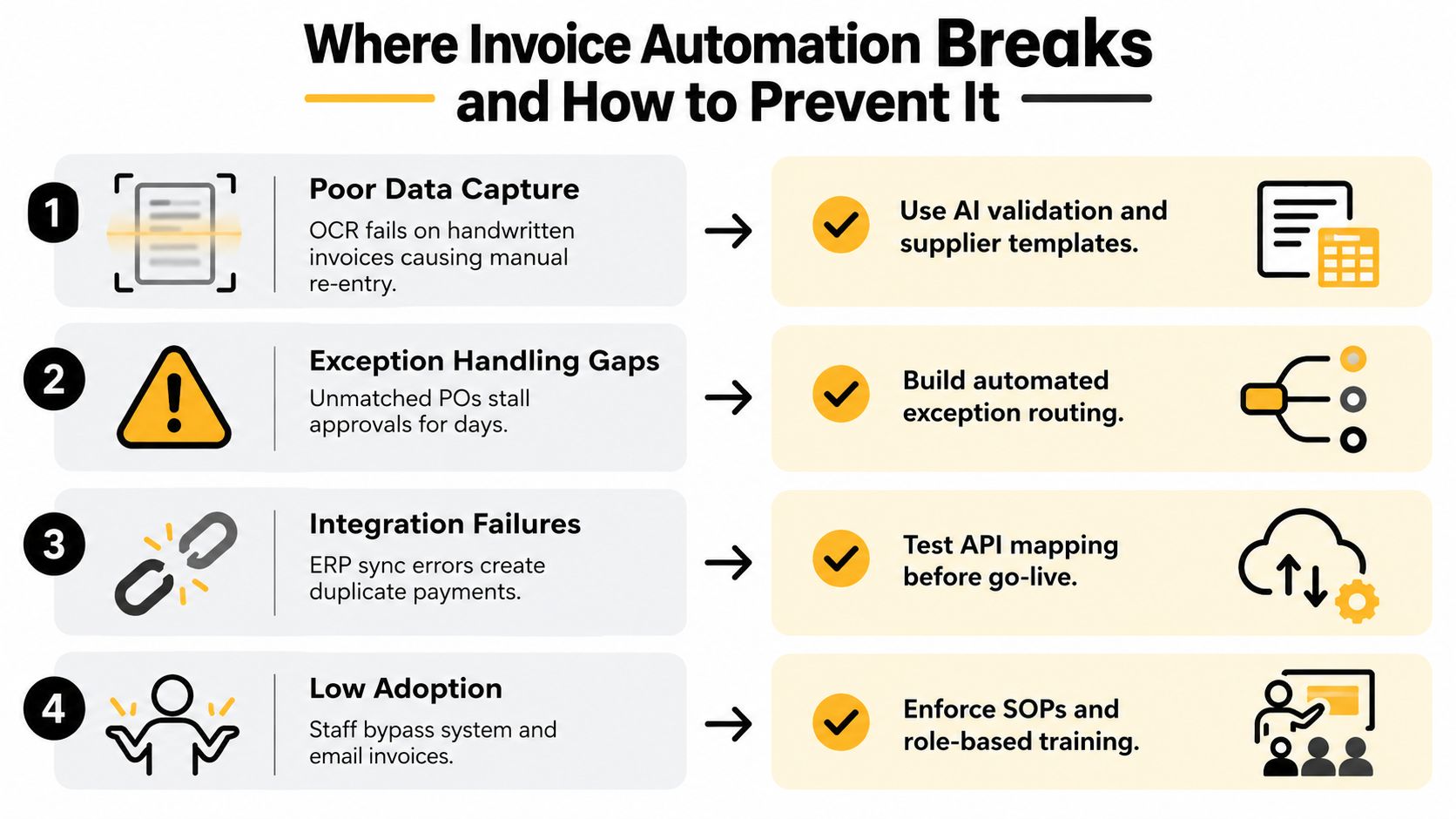
Where Invoice Automation Breaks and How to Prevent It
Buying software doesn't create straight-through processing. It creates a mechanism that can either enforce a good process or accelerate a bad one. Australian finance teams already show broad use of automation, with 99% using automation in some part of their processes and 86% using AI to some degree, according to ITBrief's coverage of Australian finance automation. Those figures indicate adoption, not workflow maturity.
The exception layer determines whether the investment sticks.
Duplicate suppliers cause avoidable payment risk
A supplier may appear under different names, ABNs or bank details. The system then treats one commercial relationship as several records, weakening duplicate detection and making spend reporting unreliable.
Clean the supplier master before launch and establish a recurring review. Restrict who can create or amend supplier records, require independent verification for bank changes and use ABN information as a control rather than relying only on supplier name.
Purchase-order mismatches stop the queue
Free-text descriptions, inconsistent units and late POs create invoices that cannot match automatically. AP then becomes the detective, contacting procurement or operations while the supplier waits.
Make the PO policy operational. Require a PO for defined spend categories, standardise units and allow clear tolerance rules for small variances. Route unmatched invoices to the person who owns the purchase, not to a generic AP inbox.
Approval bottlenecks defeat faster capture
An invoice can arrive instantly and still sit untouched when an approver travels, changes roles or doesn't understand the delegation rule. Payment governance fails when the workflow has no substitute approver, escalation path or service expectation.
Build delegation into the approval matrix. Review the matrix when staff change roles, and monitor ageing by approver. The process should support timely payment without allowing one person to bypass segregation of duties.
GST errors can spread faster
Automation applies rules consistently, including incorrect rules. Mixed supplies, unusual tax treatment and BAS-period reclassifications need a review path. A finance team should inspect GST variances before BAS lodgement rather than assuming the system's coding is correct because it was applied automatically.
Automation should make exceptions visible. It shouldn't make questionable coding invisible.
Use monthly GST variance reviews, sample transactions across suppliers and require finance ownership of tax-rule changes. The ATO's growing expectations around eInvoicing capability make system readiness important, but readiness includes controls, exception handling and evidence, not just the ability to receive a digital invoice.
A 90-Day Checklist and the Metrics That Matter
A founder doesn't need a dashboard filled with vanity measures. The first 90 days should answer four questions: what does each invoice cost, how much work passes without intervention, are payment terms under control, and which exceptions keep returning?
The rollout checklist
Use a weekly AP stand-up rather than waiting for month-end. Review the queue, assign owners and record whether each issue came from supplier data, capture, matching, approval, integration or GST coding.
Weeks 1 to 2: Clean the supplier master, map intake channels, document approval rules and establish the baseline.
Weeks 3 to 4: Configure capture, validate fields and run representative invoices through the pilot.
Weeks 5 to 6: Onboard selected suppliers, test Peppol eInvoices and review unmatched or duplicate records.
Weeks 7 to 8: Connect the accounting platform, ERP and bank feeds, then reconcile automated postings against the existing process.
Weeks 9 to 10: Train approvers, activate escalation and delegation rules, and publish the exception SOP.
Weeks 11 to 12: Expand the supplier cohort, review payment timing and audit the control trail.
The workflow should produce evidence as it runs. Keep approval history, matching outcomes, supplier changes and payment status together so finance can investigate a transaction without reconstructing it from multiple systems.
Four measures worth keeping
Cost per invoice shows whether the full process is becoming cheaper, not merely whether OCR is extracting fields. The Australian benchmark cited by SAP Concur provides a useful reference point, but your baseline should include the labour and rework specific to your business.
Straight-through processing rate shows how many invoices pass capture, validation, approval and posting without manual intervention. A falling rate usually points to a rule, supplier-master or integration problem.
Days payable outstanding is the cash-flow signal many founders overlook. Track it alongside agreed payment terms, including the different policy expectations for eInvoices and non-eInvoices in Commonwealth government processes.
Exception rate by category tells you where to invest next. Separate duplicate suppliers, PO mismatches, approval delays, GST questions and integration failures instead of hiding them in one total.
For a broader approach to selecting useful business measures, compare these AP indicators with top ecommerce metrics for passive income, particularly if inventory and supplier payments are tying up working capital. Finance leaders can also use reporting automation to distribute a consistent weekly view to founders and budget owners.
The first 90 days should end with decisions, not just a report. Keep the rules that reduce risk, redesign the exceptions that consume time and remove any manual workaround that the new process was supposed to replace.
Nexist helps Australian SMEs connect invoice automation with cash-flow forecasting, approval controls, reporting and practical finance operations, so the system supports better decisions rather than merely moving documents. Visit Nexist to discuss your AP workflow, identify cash leaks and build a finance process that gives you clearer control over payment timing.
invoice automation, eInvoicing Australia, AP automation, accounts payable, cash flow

" width="24px"/><g d="M 0 24.129 L 0 0.129 L 24 0.129 L 24 24.129 Z M 0 24.129 L 0 0.129 L 24 0.129 L 24 24.129 Z M 24 3 C 24 1.344 22.656 0 21 0 L 3 0 C 1.344 0 0 1.344 0 3 L 0 21 C 0 22.656 1.344 24 3 24 L 21 24 C 22.656 24 24 22.656 24 21 Z M 6.883 8.375 L 2.863 8.375 L 2.863 20.467 L 6.883 20.467 Z M 4.899 2.545 C 3.524 2.545 2.625 3.449 2.625 4.634 C 2.625 5.795 3.496 6.724 4.846 6.724 L 4.872 6.724 C 6.273 6.724 7.146 5.795 7.146 4.634 C 7.12 3.449 6.274 2.545 4.899 2.545 Z M 16.747 8.09 C 14.614 8.09 13.659 9.263 13.124 10.086 L 13.124 8.374 L 9.105 8.374 C 9.159 9.508 9.105 20.466 9.105 20.466 L 13.124 20.466 L 13.124 13.713 C 13.124 13.352 13.15 12.99 13.257 12.732 C 13.547 12.01 14.209 11.262 15.319 11.262 C 16.773 11.262 17.355 12.372 17.355 13.996 L 17.355 20.466 L 21.374 20.466 L 21.374 13.532 C 21.374 9.818 19.391 8.09 16.747 8.09 Z" fill="transparent" height="24.12890599668026px" id="dSFdkJotL" width="24px"><path d="M 0 24 L 0 0 L 24 0 L 24 24 Z" fill="transparent" height="24px" id="wscNJE44G" transform="translate(0 0.129)" width="24px"/><g d="M 0 24.129 L 0 0.129 L 24 0.129 L 24 24.129 Z M 24 3 C 24 1.344 22.656 0 21 0 L 3 0 C 1.344 0 0 1.344 0 3 L 0 21 C 0 22.656 1.344 24 3 24 L 21 24 C 22.656 24 24 22.656 24 21 Z M 6.883 8.375 L 2.863 8.375 L 2.863 20.467 L 6.883 20.467 Z M 4.899 2.545 C 3.524 2.545 2.625 3.449 2.625 4.634 C 2.625 5.795 3.496 6.724 4.846 6.724 L 4.872 6.724 C 6.273 6.724 7.146 5.795 7.146 4.634 C 7.12 3.449 6.274 2.545 4.899 2.545 Z M 16.747 8.09 C 14.614 8.09 13.659 9.263 13.124 10.086 L 13.124 8.374 L 9.105 8.374 C 9.159 9.508 9.105 20.466 9.105 20.466 L 13.124 20.466 L 13.124 13.713 C 13.124 13.352 13.15 12.99 13.257 12.732 C 13.547 12.01 14.209 11.262 15.319 11.262 C 16.773 11.262 17.355 12.372 17.355 13.996 L 17.355 20.466 L 21.374 20.466 L 21.374 13.532 C 21.374 9.818 19.391 8.09 16.747 8.09 Z" fill="transparent" height="24.12890599668026px" id="sTpjGo1tb" width="24px"><path d="M 0 24 L 0 0 L 24 0 L 24 24 Z" fill="transparent" height="24px" id="s7ffpmKOD" transform="translate(0 0.129)" width="24px"/><g d="M 24 3 C 24 1.344 22.656 0 21 0 L 3 0 C 1.344 0 0 1.344 0 3 L 0 21 C 0 22.656 1.344 24 3 24 L 21 24 C 22.656 24 24 22.656 24 21 Z M 6.883 8.375 L 2.863 8.375 L 2.863 20.467 L 6.883 20.467 Z M 4.899 2.545 C 3.524 2.545 2.625 3.449 2.625 4.634 C 2.625 5.795 3.496 6.724 4.846 6.724 L 4.872 6.724 C 6.273 6.724 7.146 5.795 7.146 4.634 C 7.12 3.449 6.274 2.545 4.899 2.545 Z M 16.747 8.09 C 14.614 8.09 13.659 9.263 13.124 10.086 L 13.124 8.374 L 9.105 8.374 C 9.159 9.508 9.105 20.466 9.105 20.466 L 13.124 20.466 L 13.124 13.713 C 13.124 13.352 13.15 12.99 13.257 12.732 C 13.547 12.01 14.209 11.262 15.319 11.262 C 16.773 11.262 17.355 12.372 17.355 13.996 L 17.355 20.466 L 21.374 20.466 L 21.374 13.532 C 21.374 9.818 19.391 8.09 16.747 8.09 Z" fill="transparent" height="24.000006px" id="D0ecaHEcW" transform="translate(0 0)" width="24px"><path d="M 24 3 C 24 1.344 22.656 0 21 0 L 3 0 C 1.344 0 0 1.344 0 3 L 0 21 C 0 22.656 1.344 24 3 24 L 21 24 C 22.656 24 24 22.656 24 21 Z" fill="rgb(55, 184, 218)" height="24.000006px" id="IPLFE6zXx" width="24px"/><path d="M 4.02 0 L 0 0 L 0 12.092 L 4.02 12.092 Z" fill="rgb(255, 255, 255)" height="12.09201px" id="FWhtzAyuY" transform="translate(2.863 8.375)" width="4.02px"/><path d="M 2.274 0 C 0.899 0 0 0.904 0 2.089 C 0 3.25 0.871 4.179 2.221 4.179 L 2.247 4.179 C 3.648 4.179 4.521 3.25 4.521 2.089 C 4.495 0.904 3.649 0 2.274 0 Z" fill="rgb(255, 255, 255)" height="4.17876px" id="VmOsKv4kO" transform="translate(2.625 2.545)" width="4.52095px"/><path d="M 7.641 0 C 5.509 0 4.554 1.173 4.019 1.996 L 4.019 0.284 L 0 0.284 C 0.053 1.419 0 12.376 0 12.376 L 4.019 12.376 L 4.019 5.623 C 4.019 5.262 4.045 4.9 4.151 4.642 C 4.442 3.92 5.103 3.172 6.214 3.172 C 7.667 3.172 8.25 4.282 8.25 5.907 L 8.25 12.376 L 12.269 12.376 L 12.269 5.442 C 12.269 1.728 10.286 0 7.641 0 Z" fill="rgb(255, 255, 255)" height="12.37626px" id="n1XUbhaq0" transform="translate(9.105 8.09)" width="12.268830000000001px"/></g></g></g></g></svg>)