Cybersecurity for Business: SME Guide 2026
Practical cybersecurity for business guide for Australian SMEs. Learn to assess risk, prioritise defences, & protect cash flow from cyber threats in 2026.
Ansh Malhotra

A cyber incident doesn't just create an IT headache. It hits cash, operations, customer trust, and management time all at once. For Australian small businesses, the average cost per cybercrime report reached AUD $49,600 in 2023–24, while 48% of SMEs spend less than $500 a year on cybersecurity according to Export Finance Australia's summary of ACSC-linked small business cyber risk data.
That gap is the actual story behind cybersecurity for business. Founders often treat security as a back-office technical line item, then wonder why one phishing email turns into frozen invoices, missed payroll steps, inaccessible stock systems, or weeks of distraction. In practice, poor security behaves like any other cash leak. It interrupts revenue, creates rework, and forces rushed spending at the worst possible time.
The most useful way to think about cybersecurity isn't “How technical is this?” It's “What would break first if our email, accounting login, customer records, or inventory platform went down?” If you want a broader read on the implications of security breaches for SMBs, that piece is worth reviewing alongside your risk planning.
Table of Contents
Why Cybersecurity Is a Cash Flow Issue Not an IT Problem
Cyber incidents hit revenue, payroll, collections, and delivery long before they show up as an IT ticket. For an Australian SME, that makes cybersecurity a finance issue first. If systems that move money go down, cash conversion slows, operating costs rise, and management attention shifts from growth to damage control.
The cost rarely sits in one line item. A compromised email account can delay approvals and invoice follow-up. A payroll or banking issue can trigger urgent remediation work and supplier friction. A locked inventory or booking system can stop sales for hours or days. Those losses land in margin, working capital, and customer retention.
I look at cyber the same way I look at any other operational risk. If a weakness can interrupt collections, delay fulfilment, create rework, or expose the business to legal and recovery costs, it belongs in the same review as debtor days, gross margin, and cash reserves. That is the practical overlap between cybersecurity and broader business risk management for SMEs.
The commercial impact is not limited to the first week after an incident. Businesses also absorb higher insurance scrutiny, project delays, overtime, external advisory fees, and lost trust with customers who expected reliability. The implications of security breaches for SMBs are operational as much as technical, which is why a low annual security budget often creates a much larger exposure on the P&L.
Practical rule: If a control protects email, payroll, banking access, customer records, or stock availability, treat it as protection for cash flow.
Owners do not need to become security specialists. They do need to decide where a modest preventive spend reduces the chance of a far more expensive interruption. That is a capital allocation decision, not an IT preference.
First Assess Your Real-World Business Risks
A useful risk review starts with one question. What systems and data keep money moving? If you sell products, that usually means inventory software, ecommerce platforms, supplier records, payment workflows, and email. If you run a service business, it's often email, payroll, client files, cloud storage, job scheduling, and accounting tools.

Many SMEs make the mistake of starting with a shopping list of tools. That's backwards. Start with business dependencies. A password manager, endpoint protection platform, or backup service only matters if it protects something that affects revenue, collections, payroll, supplier continuity, or compliance.
For a practical finance-led framework, I'd map cyber into the same operating discipline as broader business risk management. The categories overlap more than most owners realise.
Find the assets that actually run the business
List your operational crown jewels in plain language. Keep it short and commercial.
Cash movement systems: Banking access, payment gateways, invoicing tools, accounts receivable platforms, and payroll.
Revenue systems: Ecommerce storefronts, booking systems, quoting tools, CRM records, and email.
Operational systems: Inventory platforms, dispatch tools, supplier portals, cloud file storage, and internal documentation.
Trust-sensitive data: Customer information, employee files, tax records, and any financial documents shared with advisers.
Then tie each one to a failure consequence. If your email is compromised, invoice fraud becomes possible. If your inventory or cloud storage is locked, dispatch and fulfilment may stop. If payroll records are exposed, you're dealing with staff trust and remediation, not just system repair.
Score risk in dollars and downtime
Don't score risks by technical severity alone. Score them by business pain.
A simple founder-level method works well:
Estimate interruption cost: What would one day of downtime cost in lost sales, delayed collections, wasted wages, or missed dispatch?
Estimate recovery friction: Would you need an external IT provider, legal advice, insurer notification, or manual workarounds?
Estimate knock-on effects: Could customers lose confidence, suppliers pause service, or staff lose access to key tools?
Rank by dependency: Which systems would stop the rest of the business from functioning?
A useful risk register doesn't say “malware risk high.” It says “if accounts email is compromised, a false bank-detail change could redirect payments and delay debtor collections.”
This is also where industry examples help. Reading about mitigating Atlanta cyber threats is useful not because the geography matches, but because the attack patterns do. Email compromise, vendor impersonation, weak remote access, and poorly controlled endpoints aren't city-specific problems.
Use plain scenarios when you assess exposure:
Invoice fraud: A criminal impersonates a director or supplier and redirects a payment.
Ransomware on shared files: Staff lose access to quotes, job records, or inventory data.
Payroll or HR data exposure: Sensitive employee data leaves the business.
Supplier platform compromise: A weak third-party login opens a path into your environment.
A risk assessment is finished when you can answer three things clearly: what matters most, what would hurt cash first, and what control would reduce that risk at reasonable cost.
Prioritise Your Defences Based on Financial Impact
Security spending should follow the same logic as any other capital decision. Put the first dollars into controls that reduce the highest probability of cash loss, trading disruption, and recovery cost.
For most Australian SMEs, that starts with identity. Multi-Factor Authentication sits near the top of the list because a compromised email, cloud, finance, or remote access account can trigger payment fraud, lock out staff, and disrupt collections. DC Encompass notes that MFA reduces successful phishing breach rates by approximately 99% when implemented properly. From a finance angle, that makes MFA a basic protection for the systems tied to revenue, approvals, and payroll.
Start with the controls that protect cash movement
Sequence matters more than breadth.
Secure the identities that can approve payments, change bank details, access payroll, reset other passwords, or expose customer and employee records. In practice, that usually means email, Microsoft 365 or Google Workspace, Xero or MYOB, payroll platforms, banking-related tools, and remote access.
Then protect your ability to keep operating. Recovery controls matter because the cost of an incident is rarely limited to the initial compromise. Downtime delays invoicing, slows fulfilment, creates overtime, and can force you into expensive outside support at the worst possible time. Backups and tested recovery processes reduce that pressure.
After that, tighten permissions. Broad admin access looks convenient until one compromised account can install software, open shared data, or alter financial workflows across the business.
The better question is: which control cuts the chance of losing cash or stopping operations at the lowest reasonable cost?
Staff awareness belongs near the top of the list too, but it needs to match the way money moves through the business. Training has value when staff know how to verify bank-detail changes, challenge unusual payment requests, and escalate suspicious emails before funds leave the account.
Cybersecurity Controls Ranked by ROI for SMEs
Control | Estimated Annual Cost | Risk Reduction Impact | Primary Threat Mitigated |
|---|---|---|---|
MFA on email, cloud, finance, and remote access systems | Low to moderate | Very high for reducing account takeover and phishing success | Phishing, credential theft, account takeover |
Automated cloud and offline backups with restore testing | Moderate | High. Strong recovery value when ransomware or file loss hits critical systems | Ransomware, accidental deletion, operational disruption |
Least-privilege access and admin restriction | Low | High for limiting spread after one account is compromised | Misuse of admin rights, lateral movement |
Endpoint protection with automatic updates | Moderate | Moderate to high depending on device sprawl and user behaviour | Malware, unsafe downloads, compromised endpoints |
Staff training focused on invoice fraud and phishing verification | Low | Moderate, especially where email drives approvals and payments | Social engineering, BEC, fake supplier requests |
Annual external review and vulnerability testing | Moderate to higher | Useful for finding weaknesses before attackers do | Unknown exposures, internet-facing weaknesses |
A staged rollout usually gives SMEs the best return. Put identity and recovery controls in place first. Tighten access next. Add targeted staff training and periodic external review after that. This order keeps spend aligned with financial exposure and avoids loading the budget with tools that do little for uptime or cash protection.
Implement Affordable Protections That Actually Work
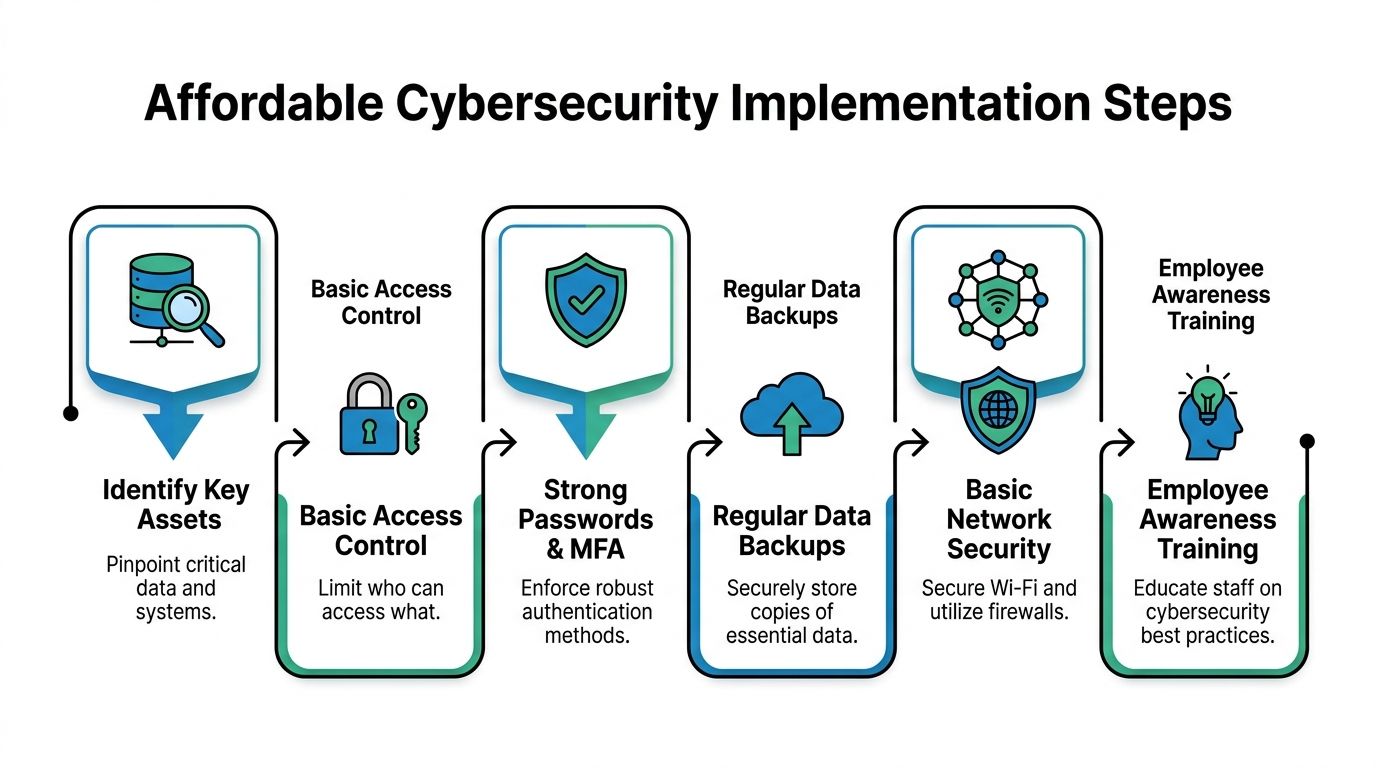
Cheap security that's properly implemented beats expensive security that nobody maintains. For most SMEs, the winning combination is simple: strong identity controls, reliable backups, automated patching, reputable endpoint protection, and a short list of enforced habits.
Set up backups you can actually restore
Backups only matter if they're isolated, recent, and tested. The 3-2-1 backup rule, three copies, two media, one offsite, combined with regular testing achieves a 94% data recovery success rate for Australian SMEs facing ransomware, compared to 42% for those without offsite backups according to Centralian's cyber guidance for SMEs.
That's why backup design should be treated as an uptime control, not a technical afterthought.
A practical setup looks like this:
Primary working data: Your live files in Microsoft 365, Google Workspace, Xero-linked exports, line-of-business platforms, and shared drives.
Secondary copy on different media: A local backup on separate hardware or storage managed outside normal day-to-day editing.
Offsite encrypted copy: Cloud backup stored separately from the main environment so ransomware can't encrypt both.
Then test recovery. Not “the dashboard says backup successful.” Restore files and confirm staff can use them.
If you've never run a restore test, you don't have a proven backup. You have a backup assumption.
Lock down access before attackers test it
The next affordable win is access control. Put MFA on every critical account, especially email, cloud storage, accounting software, and remote access. Don't stop at the obvious apps. Attackers look for the forgotten admin login, the old VPN account, or the bookkeeping user with broad permissions.
Then clean up privileges.
Remove unused accounts: Former staff, contractors, and duplicate logins should be closed.
Limit admin rights: Only a small number of trusted users should hold privileged access.
Separate duties where possible: The person raising a supplier record shouldn't be the only person able to approve changed bank details.
Use reputable endpoint protection: Microsoft Defender for Business, CrowdStrike, SentinelOne, and similar tools can be appropriate depending on size and support model. What matters is that they're centrally managed and kept current.
Patching also belongs here. Turn on automatic updates where possible for operating systems, browsers, collaboration apps, and endpoint protection agents. Manual patching sounds cheaper until one missed update opens a path into your devices.
A sensible baseline for cybersecurity for business is boring by design. The controls should run unobtrusively in the background and reduce the odds that a single user mistake turns into a financial event.
Build a Human Firewall and Secure Your Supply Chain
Most preventable losses I see start with a person trusting the wrong message, approving the wrong request, or assuming a supplier process is legitimate because the email looked familiar.

Technology helps, but staff behaviour decides whether many attacks get through. That's especially true in businesses where approvals move quickly by email, WhatsApp, or shared cloud tools.
Train staff on the scams that move money
Skip abstract awareness sessions and focus on a few high-cost scenarios:
Changed bank details: Staff must verify supplier banking changes through a known phone number or an existing trusted contact path.
Urgent payment requests: Any pressure to “pay now” or “keep this confidential” should trigger a second-person check.
Login prompts and shared links: Unexpected login pages, file-share notices, and MFA prompts need verification before action.
Executive impersonation: Attackers often mimic directors, finance leads, or external advisers to trigger rushed approvals.
Good training sounds operational, not theoretical. Show the team what a fake supplier request looks like. Walk through how to verify it. Decide who has authority to pause a payment and ask questions.
For inventory-led businesses, this should sit alongside wider supply chain resilience planning. If a cyber event blocks ordering, fulfilment, supplier coordination, or dispatch, the issue quickly becomes operational.
Check suppliers before they become your weak point
A supplier can expose you without ever touching your internal server. Cloud bookkeeping apps, logistics platforms, ecommerce plugins, payroll tools, managed IT vendors, and outsourced finance workflows all sit somewhere in your risk chain.
A practical vendor review should cover:
Vendor question | Why it matters |
|---|---|
Do they use MFA for their own admin access? | Weak supplier logins can become a backdoor into shared systems |
What data do they hold about your customers, staff, or finances? | You need to know where sensitive information sits |
How do they handle backup and recovery? | Their outage can become your outage |
Who inside your business has connected access to them? | Excess integrations expand exposure |
How will they notify you if they have an incident? | Response speed matters when operations are affected |
If you want a more detailed framework for assessing cyber risks from suppliers, that checklist is a useful companion to your own vendor review process.
Here's a short explainer worth sharing with managers when you're building team awareness around third-party exposure:
One more discipline matters. Keep a live list of vendors that touch finance, customer data, payroll, fulfilment, or internal identity systems. If you don't know which suppliers are business-critical, you can't manage supply chain risk.
Create Your Incident Response and Recovery Playbook
A business under pressure makes expensive decisions. That's why an incident playbook matters. In Australia, the average time to identify a data breach is 200 days, and the average total cost has reached AUD $3.35 million per incident according to UpGuard's Australian data breach summary. The financial lesson is clear. Delay compounds damage.
Decide who does what before anything happens
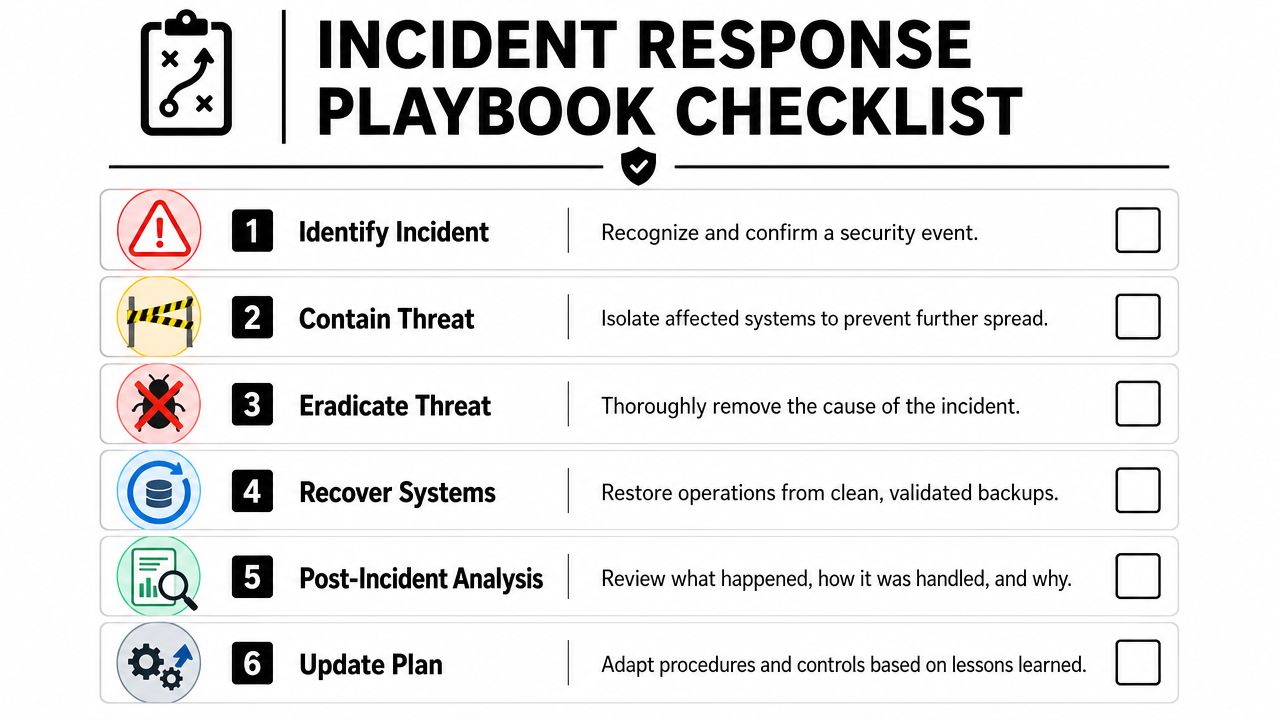
Your playbook should fit on a few pages. It isn't a policy manual. It's an action document.
Start with named roles and direct responsibilities:
Incident lead: Usually the owner, operations lead, or senior manager coordinating decisions.
Technical response contact: Internal IT lead or external provider who can isolate systems and investigate.
Finance control owner: The person who can freeze payment changes, review banking access, and monitor suspicious transactions.
Communications owner: The person responsible for staff, customer, and supplier messaging.
Insurance and legal contact: Whoever handles notification to the insurer and obtains legal advice if needed.
Then define the first-hour actions.
Isolate affected systems: Disconnect compromised devices or accounts from normal access.
Protect cash workflows: Pause bank detail changes, payment approvals, and unusual supplier updates until reviewed.
Change credentials in a controlled order: Start with email and identity systems that can reset access elsewhere.
Preserve evidence: Don't wipe everything in panic if your technical adviser needs logs or account history.
Write down the call order now. In a live incident, nobody wants to guess who to contact first.
If personal information has been exposed, assess your obligations under Australia's Notifiable Data Breaches scheme with proper legal or specialist advice. Keep that decision path in the playbook so it's not being interpreted from scratch during stress.
Recover in a controlled order
Recovery should follow business dependency, not convenience.
Bring back the systems that restore trading and financial control first. That often means identity systems, email, finance tools, core files, inventory or job systems, then secondary platforms. If backups are part of the response, restore from known clean copies and validate before reconnecting broadly.
A basic recovery sequence looks like this:
Re-secure identities: Reset and reissue access with MFA enforced.
Validate clean devices and files: Confirm restored systems aren't carrying the same problem back in.
Resume priority operations: Invoicing, collections, payroll timing, fulfilment, and supplier communication.
Document the financial effect: Lost sales, recovery costs, delayed dispatch, and time spent by senior staff.
Review the gap that let it happen: Then change the control, process, or approval design.
The post-incident review matters because many businesses fix the symptom and leave the underlying weakness untouched. If the event started with a fake invoice request, the control issue may be approval design, not just malware scanning.
Making Cybersecurity Part of Your Business Rhythm
Cybersecurity pays off when it is managed like cash flow, approvals, and reporting. For an Australian SME, the practical question is simple. Which controls reduce the chance of a trading interruption, payment loss, or collection delay, and how often does leadership check that they are working?
Put cyber review into the same cadence as finance
Cyber risk should sit inside the same management rhythm as margin review, debtor follow-up, and working capital. If leadership reviews sales, costs, and cash every month or quarter, it should also review the controls that keep invoicing, payments, payroll, and fulfilment running.
That review does not need to be technical. It needs to be disciplined.
A useful agenda is short:
Access: Who has admin rights, who joined, who left, and which exceptions still exist?
Backups: Were restore tests completed for priority systems, and did someone sign off the result?
Payments: Were supplier bank detail changes verified outside email?
Core systems: Are finance, email, remote access, and line-of-business platforms patched and protected?
Key suppliers: Did any outsourced provider change systems, contacts, or access arrangements?
The best place to anchor this is in a regular operating review such as a quarterly business review. When cyber stays outside that cadence, it slips into the category of "later" work. Later usually becomes after an avoidable loss.
Use simple operating signals not technical vanity metrics
Most owners do not need dashboard noise. They need a few signals that show whether the business can keep trading and protect cash.
Track measures that connect to uptime and financial control:
Restore success rate: Can the business recover clean data from backups for its priority systems?
MFA coverage on critical platforms: Are email, finance tools, and remote access protected?
Approval compliance: Were payment changes and sensitive requests checked through a second channel every time?
User access cleanup: How quickly are former staff removed, and how many unnecessary admin accounts remain?
Readiness status: Is the incident contact list current, including insurer, legal, IT, and decision-makers?
These are operating indicators, not vanity metrics. A board or leadership team can review them quickly, ask useful questions, and fund the gaps that carry the highest financial downside.
The goal is not perfect security. The goal is fewer preventable losses, faster recovery, and less disruption to billing, fulfilment, payroll, and customer service.
That standard suits SMEs. It respects budget limits, focuses attention on what keeps the business open, and turns cybersecurity into part of business discipline rather than a standalone IT task.
cybersecurity for business, sme cybersecurity australia, small business security, data breach prevention, financial risk management

" width="24px"/><g d="M 0 24.129 L 0 0.129 L 24 0.129 L 24 24.129 Z M 0 24.129 L 0 0.129 L 24 0.129 L 24 24.129 Z M 24 3 C 24 1.344 22.656 0 21 0 L 3 0 C 1.344 0 0 1.344 0 3 L 0 21 C 0 22.656 1.344 24 3 24 L 21 24 C 22.656 24 24 22.656 24 21 Z M 6.883 8.375 L 2.863 8.375 L 2.863 20.467 L 6.883 20.467 Z M 4.899 2.545 C 3.524 2.545 2.625 3.449 2.625 4.634 C 2.625 5.795 3.496 6.724 4.846 6.724 L 4.872 6.724 C 6.273 6.724 7.146 5.795 7.146 4.634 C 7.12 3.449 6.274 2.545 4.899 2.545 Z M 16.747 8.09 C 14.614 8.09 13.659 9.263 13.124 10.086 L 13.124 8.374 L 9.105 8.374 C 9.159 9.508 9.105 20.466 9.105 20.466 L 13.124 20.466 L 13.124 13.713 C 13.124 13.352 13.15 12.99 13.257 12.732 C 13.547 12.01 14.209 11.262 15.319 11.262 C 16.773 11.262 17.355 12.372 17.355 13.996 L 17.355 20.466 L 21.374 20.466 L 21.374 13.532 C 21.374 9.818 19.391 8.09 16.747 8.09 Z" fill="transparent" height="24.12890599668026px" id="dSFdkJotL" width="24px"><path d="M 0 24 L 0 0 L 24 0 L 24 24 Z" fill="transparent" height="24px" id="wscNJE44G" transform="translate(0 0.129)" width="24px"/><g d="M 0 24.129 L 0 0.129 L 24 0.129 L 24 24.129 Z M 24 3 C 24 1.344 22.656 0 21 0 L 3 0 C 1.344 0 0 1.344 0 3 L 0 21 C 0 22.656 1.344 24 3 24 L 21 24 C 22.656 24 24 22.656 24 21 Z M 6.883 8.375 L 2.863 8.375 L 2.863 20.467 L 6.883 20.467 Z M 4.899 2.545 C 3.524 2.545 2.625 3.449 2.625 4.634 C 2.625 5.795 3.496 6.724 4.846 6.724 L 4.872 6.724 C 6.273 6.724 7.146 5.795 7.146 4.634 C 7.12 3.449 6.274 2.545 4.899 2.545 Z M 16.747 8.09 C 14.614 8.09 13.659 9.263 13.124 10.086 L 13.124 8.374 L 9.105 8.374 C 9.159 9.508 9.105 20.466 9.105 20.466 L 13.124 20.466 L 13.124 13.713 C 13.124 13.352 13.15 12.99 13.257 12.732 C 13.547 12.01 14.209 11.262 15.319 11.262 C 16.773 11.262 17.355 12.372 17.355 13.996 L 17.355 20.466 L 21.374 20.466 L 21.374 13.532 C 21.374 9.818 19.391 8.09 16.747 8.09 Z" fill="transparent" height="24.12890599668026px" id="sTpjGo1tb" width="24px"><path d="M 0 24 L 0 0 L 24 0 L 24 24 Z" fill="transparent" height="24px" id="s7ffpmKOD" transform="translate(0 0.129)" width="24px"/><g d="M 24 3 C 24 1.344 22.656 0 21 0 L 3 0 C 1.344 0 0 1.344 0 3 L 0 21 C 0 22.656 1.344 24 3 24 L 21 24 C 22.656 24 24 22.656 24 21 Z M 6.883 8.375 L 2.863 8.375 L 2.863 20.467 L 6.883 20.467 Z M 4.899 2.545 C 3.524 2.545 2.625 3.449 2.625 4.634 C 2.625 5.795 3.496 6.724 4.846 6.724 L 4.872 6.724 C 6.273 6.724 7.146 5.795 7.146 4.634 C 7.12 3.449 6.274 2.545 4.899 2.545 Z M 16.747 8.09 C 14.614 8.09 13.659 9.263 13.124 10.086 L 13.124 8.374 L 9.105 8.374 C 9.159 9.508 9.105 20.466 9.105 20.466 L 13.124 20.466 L 13.124 13.713 C 13.124 13.352 13.15 12.99 13.257 12.732 C 13.547 12.01 14.209 11.262 15.319 11.262 C 16.773 11.262 17.355 12.372 17.355 13.996 L 17.355 20.466 L 21.374 20.466 L 21.374 13.532 C 21.374 9.818 19.391 8.09 16.747 8.09 Z" fill="transparent" height="24.000006px" id="D0ecaHEcW" transform="translate(0 0)" width="24px"><path d="M 24 3 C 24 1.344 22.656 0 21 0 L 3 0 C 1.344 0 0 1.344 0 3 L 0 21 C 0 22.656 1.344 24 3 24 L 21 24 C 22.656 24 24 22.656 24 21 Z" fill="rgb(55, 184, 218)" height="24.000006px" id="IPLFE6zXx" width="24px"/><path d="M 4.02 0 L 0 0 L 0 12.092 L 4.02 12.092 Z" fill="rgb(255, 255, 255)" height="12.09201px" id="FWhtzAyuY" transform="translate(2.863 8.375)" width="4.02px"/><path d="M 2.274 0 C 0.899 0 0 0.904 0 2.089 C 0 3.25 0.871 4.179 2.221 4.179 L 2.247 4.179 C 3.648 4.179 4.521 3.25 4.521 2.089 C 4.495 0.904 3.649 0 2.274 0 Z" fill="rgb(255, 255, 255)" height="4.17876px" id="VmOsKv4kO" transform="translate(2.625 2.545)" width="4.52095px"/><path d="M 7.641 0 C 5.509 0 4.554 1.173 4.019 1.996 L 4.019 0.284 L 0 0.284 C 0.053 1.419 0 12.376 0 12.376 L 4.019 12.376 L 4.019 5.623 C 4.019 5.262 4.045 4.9 4.151 4.642 C 4.442 3.92 5.103 3.172 6.214 3.172 C 7.667 3.172 8.25 4.282 8.25 5.907 L 8.25 12.376 L 12.269 12.376 L 12.269 5.442 C 12.269 1.728 10.286 0 7.641 0 Z" fill="rgb(255, 255, 255)" height="12.37626px" id="n1XUbhaq0" transform="translate(9.105 8.09)" width="12.268830000000001px"/></g></g></g></g></svg>)