Business Process Automation: Boost Your SME Growth in 2026
Unlock growth with business process automation for Australian SMEs. Explore ROI, use cases, and how to automate for more cash and time in 2026.
Ansh Malhotra

If you're running an SME, there's a fair chance your day starts in one system and ends in five others. You approve supplier invoices from your phone, chase overdue debtors between meetings, update a stock spreadsheet because the numbers in your platform don't quite match, and answer the same customer questions your team answered yesterday. None of that feels dramatic. It just keeps draining cash, time, and attention.
That's why business process automation matters. Not because “efficiency” sounds good in a strategy deck, but because manual work creates friction in places founders often underestimate. A delayed invoice pushes cash receipts out. A missed stock update creates over-ordering or stockouts. A payroll fix eats time twice, once to correct the error and again to explain it.
The true cost isn't the task itself. It's the compounding effect of delays, rework, and constant owner involvement. Good automation removes that drag from the operating rhythm of the business.
Table of Contents
Ending the Grind What Is Business Process Automation
Business process automation is the difference between a business that relies on people remembering things and a business that runs on a system.
In practice, that means repetitive, rule-based work gets handled automatically. A customer order triggers an invoice. An overdue account triggers a reminder. A stock movement updates the right records. A completed job pushes data into your accounting platform without someone retyping it manually.
For an ecommerce founder, the grind often shows up in order exceptions, inventory checks, and customer updates. For a trades business, it's usually quotes, scheduling handoffs, supplier paperwork, timesheets, and invoicing lag. Different industries, same problem. Too many basic tasks depend on manual follow-up.
More than task management
Task lists don't solve this. A to-do app still assumes a person has to notice the task, open the app, and do the work. Business process automation removes the manual handoff altogether where the work is predictable.
According to McKinsey's analysis of Australia's automation opportunity, approximately 44% of existing workforce activities in Australia could already be automated using technologies available today. That's the useful baseline. The issue for most SMEs isn't whether the technology exists. It's whether the owner has identified the right bottlenecks and built automation around them.
The best automation usually isn't flashy. It quietly removes the admin that keeps pulling the owner back into the weeds.
That includes front-end service work too. If your team is answering the same order-status, booking, or account questions over and over, this guide to autonomous customer support is a useful example of how repetitive service workflows can be handled without creating more inbox traffic.
What good automation actually does
At its best, automation gives you three things:
Consistency: The process runs the same way every time.
Speed: Work moves as soon as a trigger happens, not when someone gets to it.
Founder relief: The business becomes less dependent on your memory, oversight, and follow-up.
That's the point. Not more software. Less operational drag.
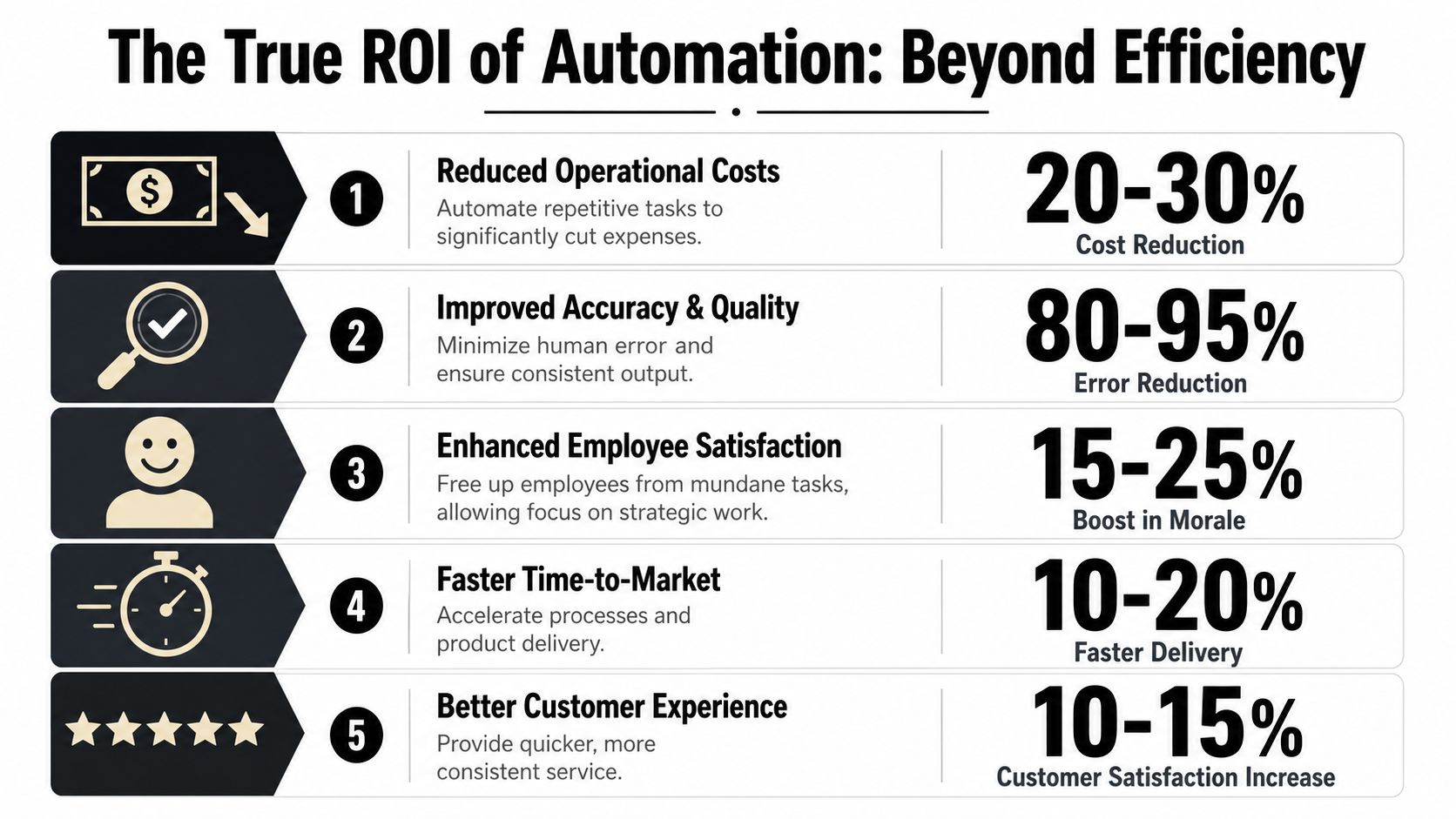
The True ROI of Automation Beyond Just Efficiency
Founders often undersell automation because they frame it as time saving. Time matters, but the stronger argument is financial. Good automation improves cash flow timing, reduces avoidable labour spend, and stops operational errors from turning into margin leaks.
For Australian SMEs, industry benchmarks cited by Digitux indicate that businesses strategically implementing automation typically achieve a first-year ROI between 200% and 400%, and the Australian process automation market is projected to grow at a CAGR of 8.60% through 2035. That matters because it shows this isn't fringe behaviour. Businesses are putting capital into it because the returns are practical.
Where the return actually shows up
The first place is receivables. If jobs are completed but invoices wait on paperwork, approval, or a manual batch process, cash gets trapped. Automating invoice generation and reminders shortens the gap between work done and cash received. If you're already reviewing working capital pressure, this piece on the cash conversion cycle helps connect workflow delays to real cash flow drag.
The second place is rework. A manual process rarely fails once. It fails, gets discovered later, then gets corrected by someone more senior. That's why admin mistakes are expensive. You pay for the original effort and the clean-up.
The third place is capacity. When a business grows without automation, headcount often rises just to keep admin from collapsing. That's a poor use of payroll. Better systems let the same team handle more volume without every increase in sales creating another layer of coordination work.
Efficiency is only one layer
A lot of founders think, “If I save a few hours, that's nice, but not a fundamental shift.” Fair enough. But the bigger gain is usually that automation changes the economics of how work flows.
Consider what happens when you automate these kinds of steps:
Invoicing and follow-up: Cash leaves “waiting to be sent” status faster.
Data transfer between systems: Staff stop keying the same information twice.
Approvals and notifications: Jobs don't stall because someone forgot to chase.
Compliance checks: Fewer exceptions reach the end of the month.
Practical rule: If a process delays billing, hides stock issues, or creates regular corrections, it's already costing more than the visible admin time.
The best ROI cases aren't always the most obvious ones. They're often the recurring points where money slows down or errors multiply. That's why finance should lead the prioritisation, not tool enthusiasm.
High-Impact Automation Areas for Your SME
Most SMEs shouldn't start by automating everything. They should start where manual work slows cash, introduces errors, or forces the owner to keep stepping in.
In Australian operations, AI-powered workflow automation can deliver a 40–60% reduction in routine task handling time and achieve 99%+ accuracy rates for data entry, compared with 92–96% accuracy for manual execution, according to KM Tech's overview of automating routine tasks with AI. Those numbers are most useful when applied to the right processes, not the most fashionable ones.
Finance workflows first
Finance is usually the cleanest place to begin because the pain is visible.
Accounts receivable is a classic example. In a manual setup, someone checks whether the job is complete, creates the invoice, emails it, tracks due dates, and follows up overdue accounts. In an automated setup, job completion or delivery confirmation triggers invoicing, reminders, and status updates automatically. The KPI that matters isn't “emails sent”. It's debtor timing and cash collection quality.
Accounts payable is similar. Manual AP creates slow approvals, duplicate handling, and poor visibility over what's due. A structured workflow routes invoices for approval, pushes coding into the accounting system, and gives the owner cleaner control over payment timing. If AP is where your admin load keeps piling up, this guide to accounts payable automation in Australia is worth reading.
Operations where founders lose margin
Inventory-heavy businesses often bleed profit through manual stock processes. Someone receives goods but delays the update. A sales channel shows stock that isn't available. Reordering happens off feel instead of reliable movement data. The result is tied-up cash, lost sales, and constant reconciliation.
Trades and service businesses have their own version of this. Timesheets get submitted late. Job notes stay in messages. Supplier dockets don't make it into the accounting workflow cleanly. Then the office team has to reconstruct the week before payroll or invoicing can happen.
Digital SOPs matter here as much as software. If the team can't follow a consistent process, automation won't save you. It will just process inconsistent inputs faster.
Manual vs Automated Processes A Comparison
Business Area | Manual Process (The Grind) | Automated Process (The System) | Key KPI Improved |
|---|---|---|---|
Accounts receivable | Invoice created after manual checks and reminders sent ad hoc | Invoice triggered by job completion or delivery milestone, with scheduled reminders and status tracking | Days Sales Outstanding |
Accounts payable | Supplier invoices sit in inboxes waiting for coding and approval | Invoices captured, routed for approval, and pushed into the accounting workflow with clear ownership | Approval cycle time |
Inventory management | Stock levels updated in spreadsheets or after the fact | Sales, purchases, and receipts sync across platforms with alerts for exceptions | Stock turn rate |
Payroll admin | Timesheets chased manually and corrections handled late | Time data collected in a standard workflow with approvals before payroll processing | Payroll error rate |
Customer service admin | Staff answer the same routine status questions repeatedly | Common requests trigger templated responses, routing, or self-service workflows | Response consistency |
SOP execution | Process knowledge lives in one staff member's head | Steps, triggers, approvals, and handoffs are documented and systemised | Task completion reliability |
A useful filter is to look for work with these traits:
High frequency: It happens daily or weekly.
Clear rules: The decision path is mostly predictable.
Multiple handoffs: Information moves between people or systems.
Expensive delay: When the task stalls, billing, stock, payroll, or service quality suffers.
That's where business process automation earns its keep fastest.
Your Automation Roadmap How to Start Smart
Most automation projects go off course before the first tool is even chosen. The problem is prioritisation. Founders automate what annoys them, not what costs them the most.
A better starting point is the bottleneck formula highlighted in Sunburnt AI's workflow automation discussion: time spent × labour cost × frequency. That's the fastest way to identify the most expensive piece of recurring admin in your business.
Start with the most expensive bottleneck
If your office manager spends time every week chasing missing job data before invoicing can happen, quantify it. If your warehouse lead keeps correcting stock discrepancies caused by delayed updates, quantify that too. If your bookkeeper spends recurring time cleaning up coding or payment approvals, put a cost on it.
This approach changes the conversation. You stop asking, “What could we automate?” and start asking, “Which friction point is burning the most money every month?”
If you can't put a rough cost on the bottleneck, you're not ready to automate it yet.
That discipline matters because first projects should be chosen for financial impact, not novelty.
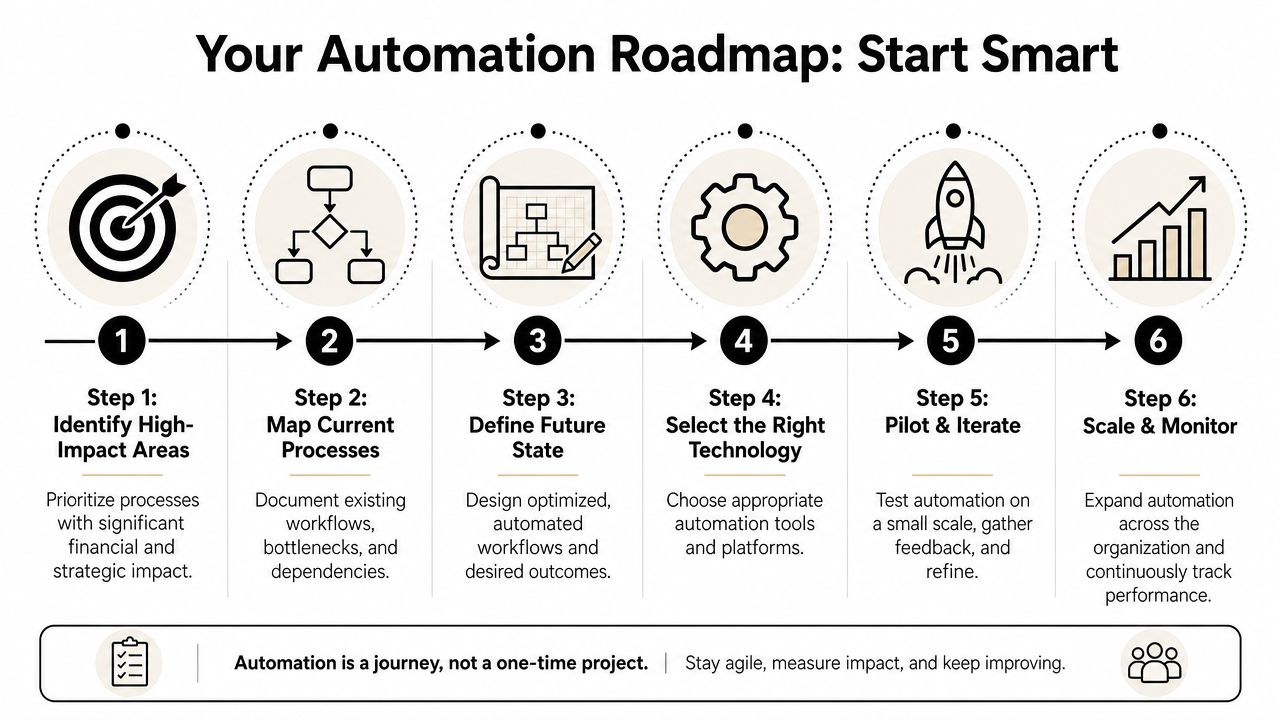
A practical four-step rollout
Australian SMEs typically invest $10,000 to $40,000 AUD for their first business process automation project, covering two to three core processes, with ROI typically achieved within 6–14 months, based on this Australian business process automation guide from eSoftware Solutions. That budget range is sensible when the chosen processes have direct cash flow or labour impact.
Use a rollout like this:
Identify and quantify
Pick one recurring process that causes delay, rework, or owner dependency. Measure the time involved, who touches it, and where the hold-up occurs.Prioritise by ROI
Rank opportunities by financial drag. A process that slows invoicing or creates stock errors usually deserves attention before a low-stakes admin irritation.Build a minimum viable automation
Don't design the perfect future-state machine on day one. Start with one trigger, one workflow, and one clear owner. For example, completed job to invoice draft. Supplier invoice received to approval queue. Order placed to stock sync and exception alert.Measure and iterate
Watch what changed. Did approvals move faster? Did billing happen earlier? Did the team stop using workarounds? Tighten the process after real use, not before.
If you want a broader operating lens before mapping workflows, OKR Hub's process efficiency advice is a practical companion read. It's useful for spotting friction that sits between teams rather than inside one task.
A final point. Fix the process before you automate it. If the approval path is unclear or the team uses different naming conventions, the software will lock bad habits into a faster system. Businesses that need that operating cleanup first often benefit from a structured business process improvement consulting approach before they start wiring tools together.
Common Pitfalls and Why Change Management Matters
Automation fails when owners treat it like software installation instead of operational redesign. The tool matters, but behaviour matters more.

What breaks automation projects
The first mistake is automating a broken process. If the workflow is already messy, the automation just executes messy steps faster. Founders often do this with approvals, stock adjustments, and job-close procedures.
The second mistake is buying a tool before defining the problem. Teams end up with Zapier, Make, Xero add-ons, CRM automations, and forms layered on top of one another without a clear operating model. That creates another kind of admin. Someone now has to manage the automation itself.
The third mistake is ignoring ownership. Every automated process still needs a human owner who reviews exceptions, updates rules, and decides when something should be handled manually.
Staff don't usually resist automation because they hate systems. They resist it when the new workflow is unclear, brittle, or dumped on them without context.
Keep humans where judgment matters
A useful rule of thumb comes from Workday's business process automation guide: tasks requiring judgment, creativity, or relationship nuance must remain human, while tasks taking more than one hour per week with predictable patterns are prime candidates for automation.
That's the line many SMEs need to hear. Not everything should be automated.
Keep people in the loop for work like:
Customer exception handling: Complaints, sensitive delays, and commercial negotiations.
Credit decisions: Especially where context matters more than a fixed rule.
Supplier relationships: Payment timing discussions and issue resolution.
Hiring and people management: Systems can support this work, but they shouldn't replace judgment.
Automate the predictable layer around those activities. Prep the information. Route the task. Trigger reminders. Create the audit trail. Then let a person make the actual call.
That's what good change management looks like. Clear ownership, clear boundaries, and clear reasons for why the workflow changed.
Quick Wins with Nexist Your Automation Partner
Most founders don't need a giant transformation program. They need a few practical wins that remove recurring friction and improve visibility over cash, stock, and workflow.
What a practical automation stack looks like
For many Australian SMEs, the stack is already partly there. Xero or MYOB handles accounting. A CRM holds sales or customer records. There may be a job management platform, inventory app, rostering tool, or ecommerce platform in the mix. The issue usually isn't lack of software. It's that the systems don't talk cleanly, and people end up bridging the gaps manually.
A finance-first automation partner starts by connecting the operational triggers to the financial outcome. When a job is completed, billing should move. When stock lands, inventory and payable records should move. When timesheets are approved, payroll prep should move. Tools like Zapier and Make are often useful because they connect systems without turning every project into custom development.
Where the early wins usually sit
The quickest wins are usually in workflows that already happen often and already frustrate the team.
Common examples include:
AR workflows: Triggering invoice creation, reminders, and debtor follow-up rules.
AP workflows: Capturing supplier bills, routing approvals, and reducing inbox chaos.
Inventory visibility: Syncing stock movements across sales, purchasing, and finance records.
Payroll prep: Standardising timesheet collection and approval before processing.
Digital SOPs: Turning tribal knowledge into repeatable workflows with clear handoffs.
A strong automation partner also acts as a filter. Not every process deserves a build. Some should be simplified first. Some should stay manual because they involve commercial judgment. Some need tighter SOPs before any automation goes live.
That's why execution matters as much as advice. Value isn't producing a list of ideas. It's translating operational pain into working systems that the team can use, maintain, and trust.
Frequently Asked Questions about Business Automation
Is business process automation only for larger companies
No. Smaller businesses often feel the pain more sharply because the owner and a small team are carrying every exception manually. A well-chosen automation project can have an outsized impact when one delayed workflow affects billing, stock, or payroll.
Do we need to replace our current software
Usually not. In many SMEs, the first gains come from improving the handoffs between existing tools rather than ripping everything out. The better question is whether your current stack supports clean triggers, approvals, and data flow.
What should we automate first
Start with the process that creates the most financial drag. That's often invoicing delay, AP approval friction, stock visibility issues, or repetitive payroll admin. If a process slows cash collection or creates recurring corrections, it deserves an early look.
Will automation reduce flexibility
It can, if it's designed badly. Good automation handles the predictable layer and leaves room for human judgment where nuance matters. The goal is structure without rigidity.
Is automation expensive to maintain
It depends on complexity and how well the workflow is designed. Simpler, well-owned automations are easier to maintain than sprawling setups with unclear logic. Start with fewer moving parts and clear accountability.
How do we know if an automation is working
Look for operational proof, not just technical proof. Is invoicing happening sooner? Are fewer tasks being chased manually? Are exceptions clearer? Has the owner stopped stepping in so often? Those are the signs that the system is reducing drag rather than shifting it.
If your business is still held together by inboxes, spreadsheets, and follow-up from memory, Nexist helps turn that operational mess into a finance-led system. The focus isn't automation for its own sake. It's better cash flow, fewer bottlenecks, and a business that runs with less owner intervention.
business process automation, sme automation, virtual cfo, process improvement, australian business

" width="24px"/><g d="M 0 24.129 L 0 0.129 L 24 0.129 L 24 24.129 Z M 0 24.129 L 0 0.129 L 24 0.129 L 24 24.129 Z M 24 3 C 24 1.344 22.656 0 21 0 L 3 0 C 1.344 0 0 1.344 0 3 L 0 21 C 0 22.656 1.344 24 3 24 L 21 24 C 22.656 24 24 22.656 24 21 Z M 6.883 8.375 L 2.863 8.375 L 2.863 20.467 L 6.883 20.467 Z M 4.899 2.545 C 3.524 2.545 2.625 3.449 2.625 4.634 C 2.625 5.795 3.496 6.724 4.846 6.724 L 4.872 6.724 C 6.273 6.724 7.146 5.795 7.146 4.634 C 7.12 3.449 6.274 2.545 4.899 2.545 Z M 16.747 8.09 C 14.614 8.09 13.659 9.263 13.124 10.086 L 13.124 8.374 L 9.105 8.374 C 9.159 9.508 9.105 20.466 9.105 20.466 L 13.124 20.466 L 13.124 13.713 C 13.124 13.352 13.15 12.99 13.257 12.732 C 13.547 12.01 14.209 11.262 15.319 11.262 C 16.773 11.262 17.355 12.372 17.355 13.996 L 17.355 20.466 L 21.374 20.466 L 21.374 13.532 C 21.374 9.818 19.391 8.09 16.747 8.09 Z" fill="transparent" height="24.12890599668026px" id="dSFdkJotL" width="24px"><path d="M 0 24 L 0 0 L 24 0 L 24 24 Z" fill="transparent" height="24px" id="wscNJE44G" transform="translate(0 0.129)" width="24px"/><g d="M 0 24.129 L 0 0.129 L 24 0.129 L 24 24.129 Z M 24 3 C 24 1.344 22.656 0 21 0 L 3 0 C 1.344 0 0 1.344 0 3 L 0 21 C 0 22.656 1.344 24 3 24 L 21 24 C 22.656 24 24 22.656 24 21 Z M 6.883 8.375 L 2.863 8.375 L 2.863 20.467 L 6.883 20.467 Z M 4.899 2.545 C 3.524 2.545 2.625 3.449 2.625 4.634 C 2.625 5.795 3.496 6.724 4.846 6.724 L 4.872 6.724 C 6.273 6.724 7.146 5.795 7.146 4.634 C 7.12 3.449 6.274 2.545 4.899 2.545 Z M 16.747 8.09 C 14.614 8.09 13.659 9.263 13.124 10.086 L 13.124 8.374 L 9.105 8.374 C 9.159 9.508 9.105 20.466 9.105 20.466 L 13.124 20.466 L 13.124 13.713 C 13.124 13.352 13.15 12.99 13.257 12.732 C 13.547 12.01 14.209 11.262 15.319 11.262 C 16.773 11.262 17.355 12.372 17.355 13.996 L 17.355 20.466 L 21.374 20.466 L 21.374 13.532 C 21.374 9.818 19.391 8.09 16.747 8.09 Z" fill="transparent" height="24.12890599668026px" id="sTpjGo1tb" width="24px"><path d="M 0 24 L 0 0 L 24 0 L 24 24 Z" fill="transparent" height="24px" id="s7ffpmKOD" transform="translate(0 0.129)" width="24px"/><g d="M 24 3 C 24 1.344 22.656 0 21 0 L 3 0 C 1.344 0 0 1.344 0 3 L 0 21 C 0 22.656 1.344 24 3 24 L 21 24 C 22.656 24 24 22.656 24 21 Z M 6.883 8.375 L 2.863 8.375 L 2.863 20.467 L 6.883 20.467 Z M 4.899 2.545 C 3.524 2.545 2.625 3.449 2.625 4.634 C 2.625 5.795 3.496 6.724 4.846 6.724 L 4.872 6.724 C 6.273 6.724 7.146 5.795 7.146 4.634 C 7.12 3.449 6.274 2.545 4.899 2.545 Z M 16.747 8.09 C 14.614 8.09 13.659 9.263 13.124 10.086 L 13.124 8.374 L 9.105 8.374 C 9.159 9.508 9.105 20.466 9.105 20.466 L 13.124 20.466 L 13.124 13.713 C 13.124 13.352 13.15 12.99 13.257 12.732 C 13.547 12.01 14.209 11.262 15.319 11.262 C 16.773 11.262 17.355 12.372 17.355 13.996 L 17.355 20.466 L 21.374 20.466 L 21.374 13.532 C 21.374 9.818 19.391 8.09 16.747 8.09 Z" fill="transparent" height="24.000006px" id="D0ecaHEcW" transform="translate(0 0)" width="24px"><path d="M 24 3 C 24 1.344 22.656 0 21 0 L 3 0 C 1.344 0 0 1.344 0 3 L 0 21 C 0 22.656 1.344 24 3 24 L 21 24 C 22.656 24 24 22.656 24 21 Z" fill="rgb(55, 184, 218)" height="24.000006px" id="IPLFE6zXx" width="24px"/><path d="M 4.02 0 L 0 0 L 0 12.092 L 4.02 12.092 Z" fill="rgb(255, 255, 255)" height="12.09201px" id="FWhtzAyuY" transform="translate(2.863 8.375)" width="4.02px"/><path d="M 2.274 0 C 0.899 0 0 0.904 0 2.089 C 0 3.25 0.871 4.179 2.221 4.179 L 2.247 4.179 C 3.648 4.179 4.521 3.25 4.521 2.089 C 4.495 0.904 3.649 0 2.274 0 Z" fill="rgb(255, 255, 255)" height="4.17876px" id="VmOsKv4kO" transform="translate(2.625 2.545)" width="4.52095px"/><path d="M 7.641 0 C 5.509 0 4.554 1.173 4.019 1.996 L 4.019 0.284 L 0 0.284 C 0.053 1.419 0 12.376 0 12.376 L 4.019 12.376 L 4.019 5.623 C 4.019 5.262 4.045 4.9 4.151 4.642 C 4.442 3.92 5.103 3.172 6.214 3.172 C 7.667 3.172 8.25 4.282 8.25 5.907 L 8.25 12.376 L 12.269 12.376 L 12.269 5.442 C 12.269 1.728 10.286 0 7.641 0 Z" fill="rgb(255, 255, 255)" height="12.37626px" id="n1XUbhaq0" transform="translate(9.105 8.09)" width="12.268830000000001px"/></g></g></g></g></svg>)